Ключові слова для контекстної реклами визначають, за якими запитами користувач може побачити ваше оголошення в Google. Якщо семантика зібрана поверхово, реклама швидко витрачає бюджет на нецільові кліки: люди переходять на сайт, але не залишають заявки, не купують і не рухаються далі по воронці.
Підбір ключових слів для контекстної реклами починається з розуміння бізнесу, попиту, посадкових сторінок, географії, комерційного інтенту і структури майбутньої кампанії. Для пошукової реклами в Google Ads ключове слово має бути пов’язане з конкретною потребою користувача, релевантним оголошенням і сторінкою, на яку веде реклама.
Якщо потрібна повна підготовка кампаній – від семантики й структури до оголошень, аналітики та оптимізації, перегляньте послугу контекстна реклама в Google Ads . У SEO-Evolution ми зазвичай починаємо роботу з рекламою не з оголошень, а з перевірки попиту, посадкових сторінок, аналітики й структури майбутніх груп оголошень. Такий підхід допомагає одразу відокремити комерційні запити від інформаційних, не змішувати різні наміри користувачів і не витрачати бюджет на фрази, які не ведуть до заявки або продажу.
У цій статті розберемо, як підібрати ключові слова для Google Ads самостійно: де шукати запити, як працює Планувальник ключових слів Google, як вибрати типи відповідності, як зібрати мінус-слова і як перевіряти семантику після запуску реклами.
Що таке ключові слова в Google Ads
Ключові слова Google Ads – це слова або фрази, які рекламодавець додає в кампанію, щоб система могла зіставити рекламу з пошуковим попитом користувачів. Для юридичної компанії це можуть бути запити щодо консультації адвоката, для інтернет-магазину – назви категорій і товарів, для клініки – назви послуг, діагностики або лікарських напрямів.
Якщо в старих матеріалах ви бачите формулювання Adwords ключові слова, йдеться про той самий напрям, але актуальна назва рекламної платформи – Google Ads. Логіка підбору залишилася схожою: потрібно знайти запити, які відповідають попиту клієнта, бюджету, посадковій сторінці й цілі кампанії.
Чим ключове слово відрізняється від пошукового запиту
Ключове слово додає рекламодавець, а пошуковий запит вводить користувач. Через типи відповідності одне ключове слово може показувати оголошення за різними варіантами запитів. Саме тому в Google Ads недостатньо один раз зібрати список ключів і запустити кампанію.
Наприклад, ви додаєте ключове слово ремонт квартир. Оголошення може показуватися людям, які шукають ремонт квартири під ключ, ремонт квартири ціна, майстри для ремонту квартири, а за надто широкого налаштування – і за суміжними або слабко релевантними формулюваннями. Після запуску кампанії перевіряйте звіт пошукових запитів Google Ads , щоб бачити реальні фрази користувачів, які активували показ оголошень.
Спочатку визначте ціль реклами
Перед збором семантики визначте, яку дію має зробити користувач після кліку. Це може бути заявка, дзвінок, покупка, бронювання, консультація, реєстрація, завантаження прайсу або перехід у месенджер. Від цілі залежить, які ключові запити для реклами залишати, а які прибирати ще до запуску.
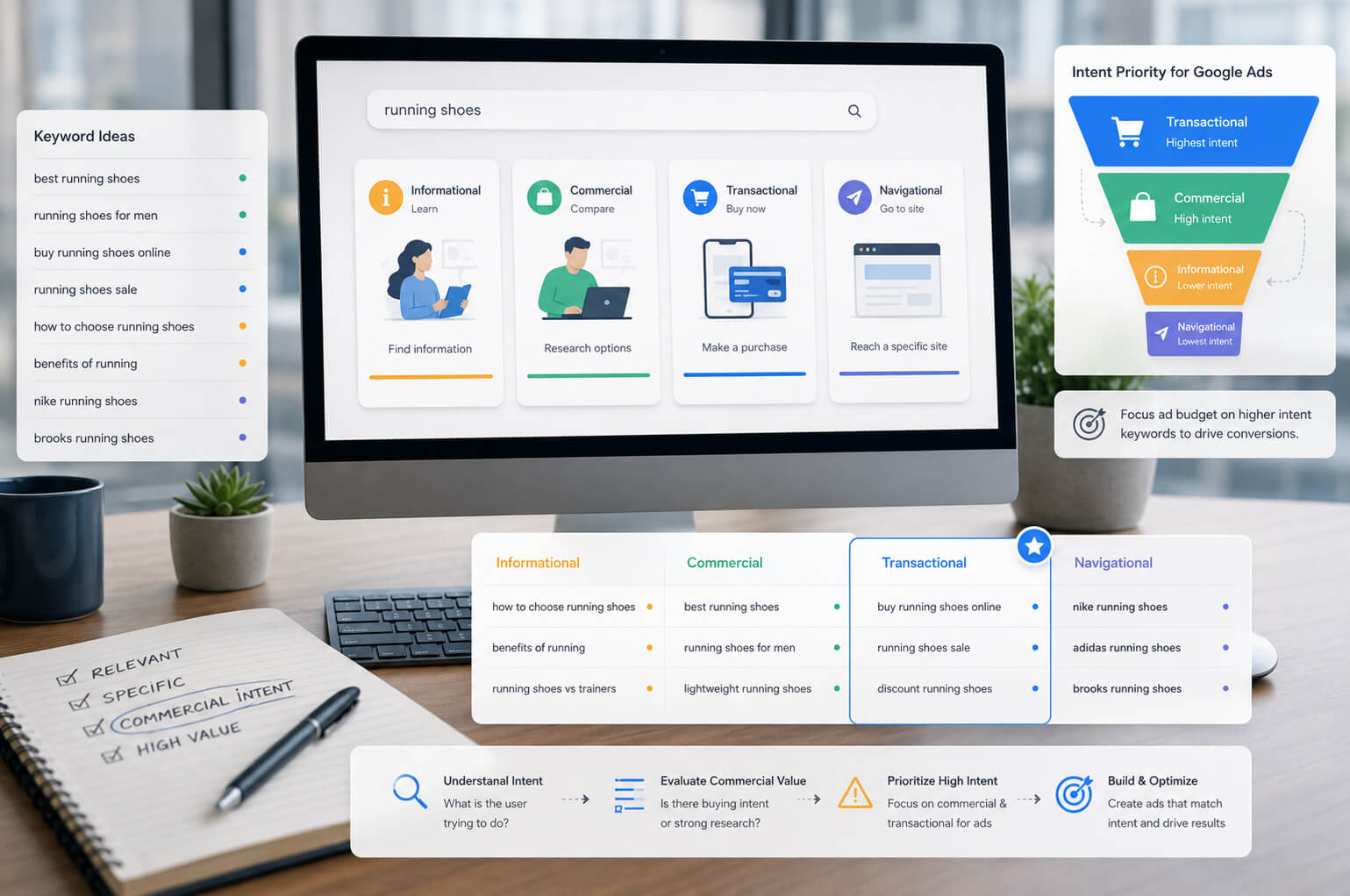
Для кампанії, яка має приводити заявки, пріоритет отримують комерційні запити. Вони показують, що людина вже шукає виконавця, товар, послугу, ціну, умови або конкретне рішення. Інформаційні запити будуть корисні для блогу, ремаркетингу або верхньої частини воронки, але в пошуковій рекламі вони часто дають довший і дорожчий шлях до заявки.
| Тип запиту | Приклад | Як використовувати в Google Ads |
| Комерційний | замовити аудит Google Ads, адвокат консультація ціна, купити двері міжкімнатні | Додайте в основні групи оголошень, якщо є релевантна посадкова сторінка. |
| Локальний | стоматологія Київ, ремонт ноутбуків Львів, доставка квітів Одеса | Використовуйте для бізнесів, де географія впливає на вибір клієнта. |
| Брендовий | назва компанії, назва магазину, назва сервісу | Виносьте в окрему кампанію або групу, щоб не змішувати з холодним попитом. |
| Конкурентний | назва конкурента, аналог сервісу, альтернатива бренду | Перевірте політики Google, економіку кампанії та ризик слабкої конверсії. |
| Інформаційний | як вибрати двері, що таке контекстна реклама, як лікують карієс | Виносьте в окрему логіку, якщо є бюджет на прогрів аудиторії. |
Де шукати ключові слова для Google Ads
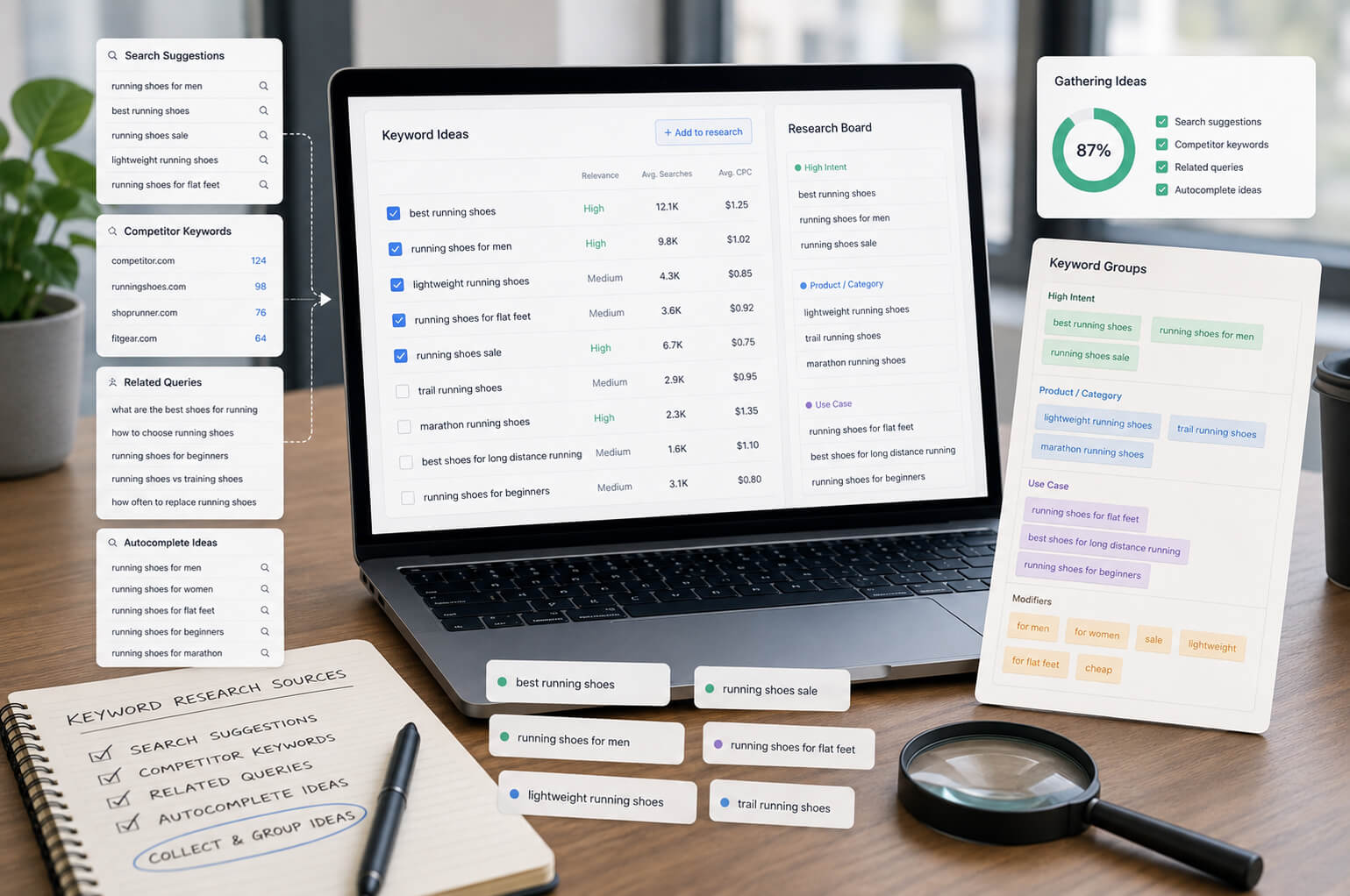
Збір семантики для Google Ads краще робити з кількох джерел. Один інструмент рідко показує повну картину попиту, а реальні формулювання користувачів часто відрізняються від того, як бізнес описує свої послуги на сайті.
-
Сторінки сайту. Випишіть назви послуг, категорій, товарів, брендів, міст, районів, форматів роботи, проблем клієнтів і комерційних уточнень.
-
Google Keyword Planner. Перевірте ідеї ключових слів, частотність, прогноз, конкуренцію і приблизну вартість кліка за ключовим словом.
-
Пошукова видача Google. Перегляньте підказки, пов’язані запити, рекламні оголошення і типи посадкових сторінок у конкурентів.
-
CRM і заявки. Подивіться, як клієнти формулюють потребу в реальних зверненнях. У таких повідомленнях часто є фрази, яких немає на сайті.
-
Google Search Console. Якщо сайт уже має органічний трафік, перевірте запити з показами й кліками. Частину з них можна використати для реклами.
-
Конкуренти. Використайте аналіз ключових слів конкурентів як джерело гіпотез, але перевіряйте кожну фразу перед додаванням у кампанію.
Для складних проєктів поєднуйте підбір ключових слів із перевіркою посадкових сторінок, аналітики та рекламного акаунта. Якщо кампанії вже працюють, але бюджет витрачається без зрозумілого результату, почніть з аудиту рекламного акаунта .
Планувальник ключових слів Google
Планувальник ключових слів Google – базовий сервіс підбору ключових слів Google всередині Google Ads. Він допомагає знайти нові ключові слова, переглянути орієнтовну частотність, конкуренцію, прогноз кліків, показів і приблизну вартість кліка. Офіційна довідка Google описує два основні сценарії: пошук нових ключових слів і перегляд обсягу пошуку та прогнозів для вже підготовленого списку. Інструкція Google Keyword Planner допоможе звірити актуальний шлях у кабінеті.
Щоб зібрати ключові слова Google Ads через Keyword Planner, зробіть так:
-
Відкрийте Google Ads і перейдіть у Планувальник ключових слів Google.
-
Оберіть пошук нових ключових слів.
-
Введіть базові фрази, назви послуг, категорій або URL посадкової сторінки.
-
Вкажіть країну, місто або регіон, якщо реклама працює не на всю країну.
-
Перегляньте ідеї, частотність ключових слів, конкуренцію і діапазон ставок.
-
Приберіть запити без комерційного інтенту, дублікати, занадто широкі теми й нерелевантні напрями.
-
Розподіліть ключі за групами оголошень, щоб кожна група мала окрему тему.
Не оцінюйте ключ тільки за частотністю. Запит із меншим обсягом пошуку може давати більше заявок, якщо в ньому є чіткий комерційний намір. Наприклад, фраза купити генератор 5 кВт часто цінніша для реклами, ніж широка фраза генератор, хоча друга може мати більший попит.
Оцінка ключових слів перед запуском
Після збору першого списку перевірте кожну групу ключів за кількома критеріями. Так ви не перенесете в кампанію зайві слова для реклами, які збільшать витрати, але не дадуть заявок.
| Критерій | Що перевірити |
| Інтент ключового запиту | Зрозумійте, що хоче користувач: купити, замовити, порівняти, знайти ціну, отримати інструкцію чи просто дізнатися загальну інформацію. |
| Релевантність сторінці | Перевірте, чи відповідає посадкова сторінка конкретному запиту. Якщо ключ про ціну, на сторінці має бути ціна, прайс, калькулятор або пояснення формування вартості. |
| Частотність | Великий обсяг пошуку не гарантує заявок. У контекстній рекламі часто краще працюють точніші запити з меншим, але теплішим попитом. |
| Вартість кліка | Порівняйте ставку з маржею, середнім чеком і конверсією сайту. Дорогий клік може бути нормальним, якщо заявка окупається. |
| Географія | Для локальних послуг додайте географічні ключові слова й окремо налаштуйте місцеположення в кампанії. |
| Якість трафіку | Після запуску оцінюйте заявки, продажі, дзвінки, ROAS, CPA і якість лідів, а не тільки кількість кліків. |
У проєктах SEO-Evolution ми не оцінюємо ключові слова тільки за частотністю. Перед запуском дивимося, чи є під запит відповідна сторінка, чи зрозумілий комерційний намір, чи може бізнес обробити таку заявку і чи співвідноситься орієнтовна вартість кліка з маржею або середнім чеком. Іноді менш частотний запит дає кращий результат, ніж широка фраза з великим обсягом пошуку.
Які ключові слова прибрати зі списку
Не додавайте в основну пошукову кампанію занадто загальні слова, інформаційні запити без окремої стратегії, фрази з незрозумілим наміром, назви чужих брендів без аналізу ризиків і ключі, для яких на сайті немає релевантної сторінки.
Google оцінює якість реклами через кілька факторів, серед яких очікуваний CTR, релевантність оголошення і якість посадкової сторінки. Довідка Google про Quality Score показує, чому підбір ключових фраз для реклами потрібно пов’язувати з текстом оголошення та сторінкою переходу.
Аналіз ключових слів конкурентів
Аналіз реклами конкурентів Google Ads допомагає побачити, які напрями попиту вже використовують інші гравці ринку. Завдання не в копіюванні чужої семантики. Конкуренти дають ідеї, які потрібно перевірити через Keyword Planner, посадкову сторінку, бюджет і комерційний інтент.
-
Введіть у Google основні комерційні запити вашої ніші.
-
Подивіться, які рекламні оголошення показуються стабільно.
-
Зверніть увагу на заголовки, уточнення ціни, гарантії, географію, доставку, терміни, консультацію або інші аргументи.
-
Відкрийте посадкові сторінки й оцініть, під які групи запитів вони створені.
-
Занесіть ідеї в окремий список, а потім відфільтруйте їх за релевантністю.
Аналіз сайту конкурента на ключові слова дає частину картини, але не показує економіку реклами. У конкурента можуть бути інші маржа, бюджет, брендова впізнаваність, відділ продажів, конверсія сайту й цілі кампанії. Ключ, який працює в іншого бізнесу, може бути збитковим для вас.
Групування ключових слів по групах оголошень
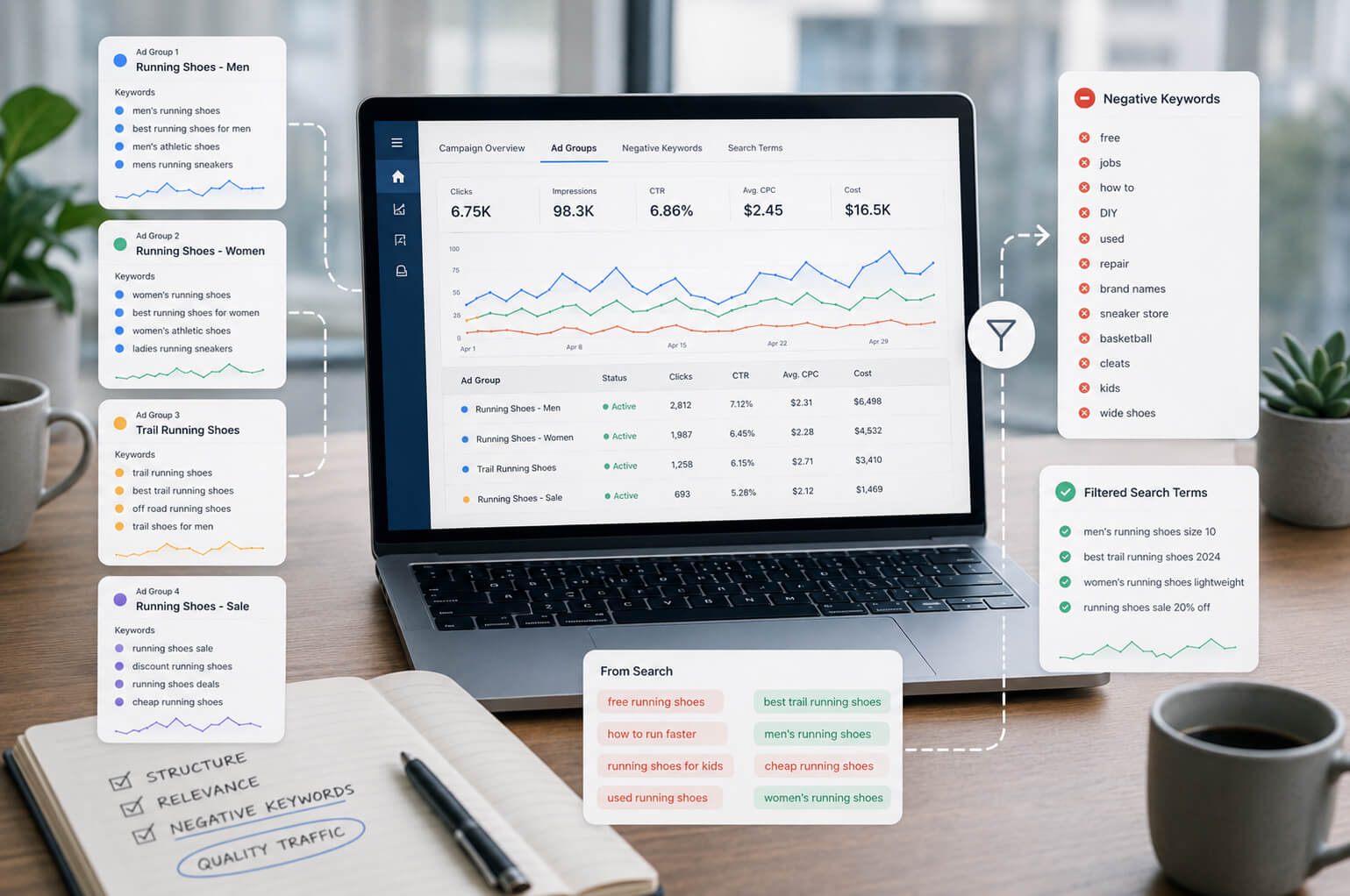
Групування ключових слів потрібне, щоб кожна група оголошень мала одну зрозумілу тему. Google рекомендує групувати схожі ключі за продуктами, послугами або категоріями, щоб користувач бачив релевантніше оголошення. Офіційна довідка Google про ключові слова в пошукових кампаніях також радить об’єднувати схожі ключі в групи оголошень.
Не складайте всі ключові слова для реклами в одну групу. Якщо в одній групі змішані ремонт квартир, дизайн інтер’єру, ремонт ванної і будівельна компанія, оголошення буде надто загальним. Користувач із запитом ремонт ванної під ключ має бачити оголошення про ремонт ванної, а не універсальний текст про всі ремонтні послуги.
| Група оголошень | Приклади ключових слів | Посадкова сторінка |
| Ремонт квартир | ремонт квартир, ремонт квартири ціна, ремонт квартири під ключ | Сторінка послуги ремонту квартир |
| Ремонт ванної | ремонт ванної кімнати, ремонт ванної під ключ, ремонт санвузла ціна | Окрема сторінка ремонту ванної |
| Дизайн інтер’єру | дизайн інтер’єру, дизайн квартири ціна, проєкт дизайну інтер’єру | Сторінка дизайну інтер’єру |
| Локальні запити | ремонт квартир Київ, ремонт ванної Київ, дизайн інтер’єру Київ | Сторінка послуги з локальними елементами |
Для старту достатньо логіки: одна тема – одна група оголошень. Не дробіть кампанію до десятків груп без даних, але й не змішуйте запити з різними намірами. Орієнтуйтеся на зміст запиту, текст оголошення і сторінку, яка найкраще відповідає потребі користувача.
Типи відповідності ключових слів у Google Ads
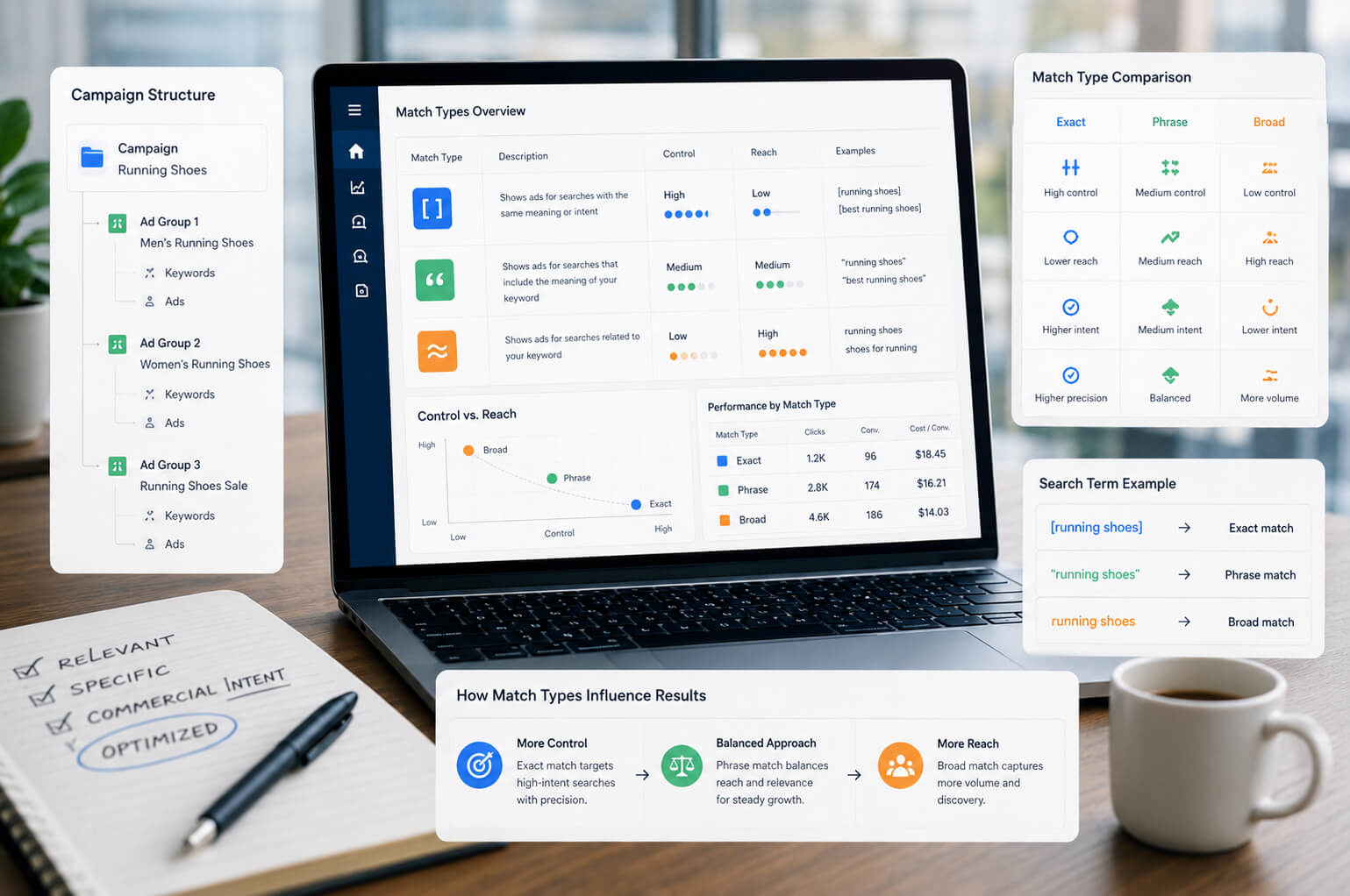
Типи відповідності ключових слів визначають, наскільки близьким має бути пошуковий запит до ключового слова, щоб оголошення могло взяти участь в аукціоні. У Google Ads використовуються broad match, phrase match і exact match. Офіційна довідка Google пояснює, що широка відповідність дає більше охоплення, фразова – проміжний контроль, а точна допомагає точніше керувати запитами. Докладніше про типи відповідності Google Ads .
| Тип відповідності | Як працює | Коли використовувати | Ризик |
| Широка відповідність | Оголошення може показуватися за ширшим колом пов’язаних запитів. | Коли є достатньо даних, конверсії, Smart Bidding і регулярний контроль пошукових запитів. | Може привести багато нецільового трафіку без мінус-слів і аналітики. |
| Фразова відповідність | Оголошення показується за запитами, які зберігають зміст ключової фрази. | Для більшості стартових пошукових кампаній, коли потрібен баланс між охопленням і контролем. | Потребує перевірки реальних пошукових запитів після запуску. |
| Точна відповідність | Оголошення показується за найближчими за змістом запитами. | Для найцінніших комерційних запитів, контролю бюджету і тестування точних груп. | Може обмежити охоплення, якщо використовувати тільки цей тип. |
Для нового акаунта починайте з фразової та точної відповідності для найбільш комерційних запитів. Широку відповідність підключайте після налаштування цілей, відстеження заявок, стартового списку мінус-слів і зрозумілої структури кампаній.
Мінус-слова Google Ads
Мінус-слова для контекстної реклами допомагають виключити нерелевантні запити й не витрачати бюджет на кліки, які не ведуть до цільової дії. Google пояснює, що мінус-слова в пошукових кампаніях можуть мати широку, фразову або точну відповідність, але працюють інакше, ніж звичайні ключові слова. Довідка Google про мінус-слова .
Під час першого збору семантики створіть базовий список мінус-слів. Не беріть його механічно з чужих шаблонів: слово, яке відсікає зайвий трафік одному бізнесу, може прибрати цінні запити іншому.
| Тип нецільового запиту | Приклади мінус-слів | Навіщо виключати |
| Безкоштовний попит | безкоштовно, скачати, шаблон, самостійно | Такі запити рідко приводять платоспроможних клієнтів у комерційних кампаніях. |
| Навчання і робота | курс, вакансія, робота, зарплата, навчання | Користувач шукає роботу або навчальні матеріали, а не послугу. |
| Інформаційні теми | що таке, як зробити самому, інструкція, приклад | Може бути корисним для блогу, але не завжди для кампанії з оплатою за клік. |
| Нерелевантні сегменти | б/у, дешево, форум, відгуки працівників | Додавайте після перевірки змісту запиту й бізнес-моделі. |
Після запуску доповнюйте список через звіт пошукових запитів, а не за шаблонами з інтернету.
Як пов’язати ключі, оголошення і сторінку
Ключова група має вести до оголошення і сторінки з тією самою темою. Запит ремонт ванної кімнати не повинен вести на універсальну сторінку всіх ремонтних робіт, якщо на сайті є окремий розділ про ванни. Так користувач бачить відповідь на свій запит уже в оголошенні, а на сторінці знаходить потрібні деталі.
У Google Ads для пошукових кампаній використовуються responsive search ads. Google дозволяє додавати кілька заголовків і описів, а система тестує різні комбінації, щоб показувати релевантніше повідомлення. Довідка Google про responsive search ads пояснює, як працює цей формат.
Найпростіше показати логіку на одній групі оголошень: які запити в неї входять, що написано в заголовках, який опис бачить користувач і на яку сторінку він переходить після кліку.
| Елемент | Приклад |
| Ключові слова | ремонт ванної кімнати, ремонт ванної під ключ, ремонт санвузла ціна |
| Заголовки оголошення | Ремонт Ванної Під Ключ; Ремонт Санвузла З Гарантією; Прорахунок Вартості До Старту |
| Опис оголошення | Плитка, сантехніка, електрика і чистові роботи в одному проєкті. Залиште заявку, щоб отримати попередній розрахунок. |
| Посадкова сторінка | Окрема сторінка про ремонт ванної, а не загальна сторінка всіх ремонтних послуг. |
Приклади рекламних текстів використовуйте тільки як чернетку. У фінальному оголошенні залишайте конкретні аргументи: ціну, терміни, гарантію, регіон, формат роботи, консультацію, доставку, досвід, сертифікати або кейси. Заголовки й описи мають відповідати ключовій групі та сторінці, на яку веде реклама.
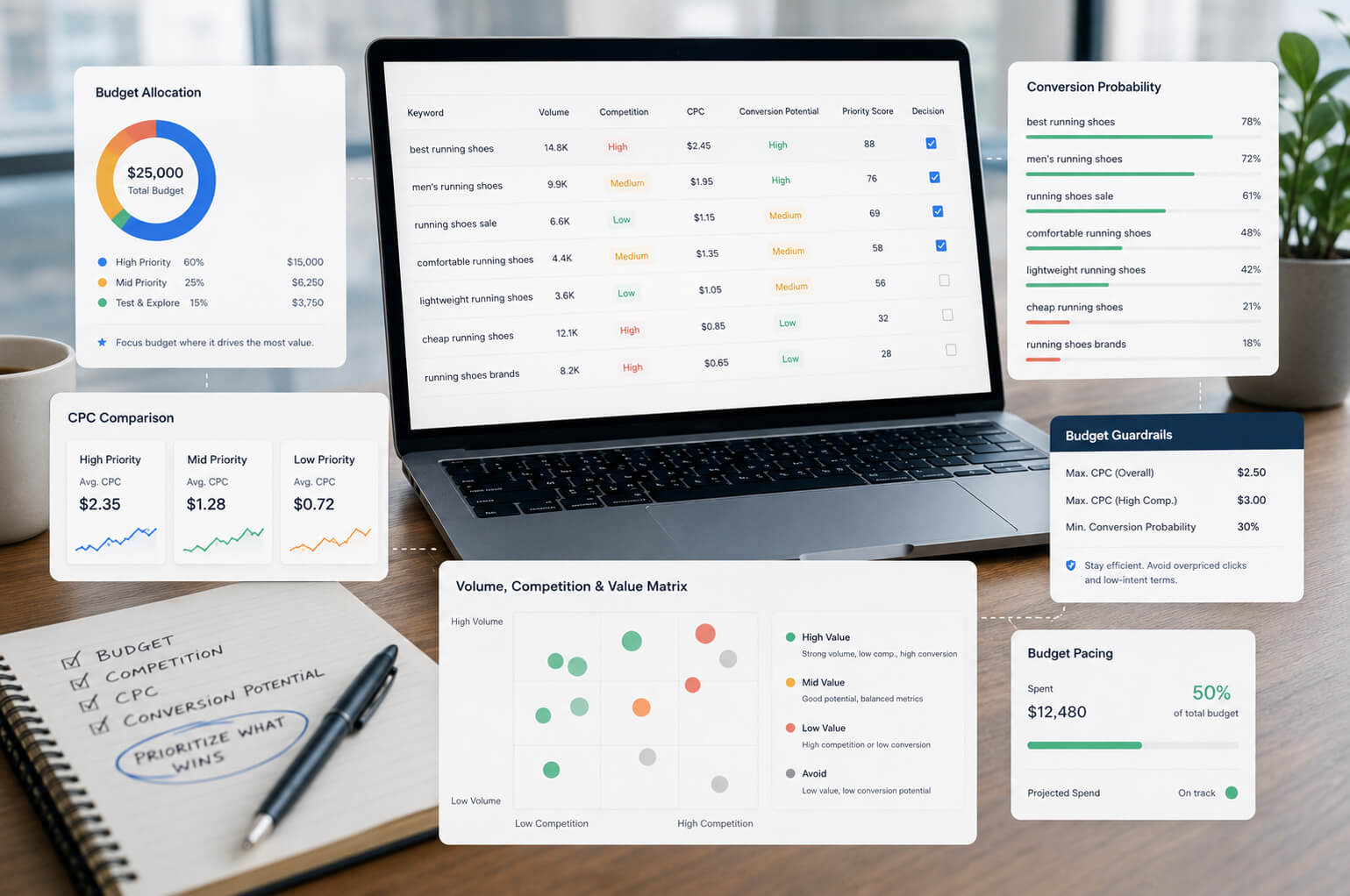
Приклад структури ключових слів для кампанії
Нижче – універсальний приклад семантики для контекстної реклами. Це модель, яка показує, як розбити семантику для реклами за наміром користувача.
| Кампанія | Група оголошень | Ключові слова | Тип сторінки |
| Пошукова реклама послуг | Основна послуга | налаштування Google Ads, контекстна реклама Google Ads, запустити рекламу в Google | Сторінка послуги |
| Пошукова реклама послуг | Аудит реклами | аудит Google Ads, перевірка рекламного акаунта, аудит контекстної реклами | Сторінка аудиту |
| Пошукова реклама послуг | Локальні запити | налаштування Google Ads Київ, контекстна реклама Львів, реклама Google для бізнесу Одеса | Сторінка послуги з локальними елементами |
| Пошукова реклама послуг | Ціна | вартість налаштування Google Ads, ціна контекстної реклами, скільки коштує реклама в Google | Сторінка з цінами або поясненням бюджету |
| Пошукова реклама послуг | Інформаційні запити | як працює контекстна реклама, приклад контекстної реклами, що таке Google Ads | Стаття блогу або окрема інформаційна кампанія |
Якщо реклама веде на комерційні сторінки, не змішуйте інформаційні запити з гарячими комерційними ключами. Для ширшого ознайомлення користувача з темою можна використати статтю про те, як працює контекстна реклама для бізнесу . А для системного запуску платних каналів перегляньте загальну сторінку реклами в інтернеті .
Пошукові запити після запуску реклами
У супроводі Google Ads ми в SEO-Evolution розділяємо запити на три групи: ті, що варто залишити й масштабувати, ті, що потрібно винести в окремі групи оголошень, і ті, які треба додати в мінус-слова. Це допомагає не просто зменшувати зайві витрати, а поступово робити кампанію точнішою за фактичними даними.
Після запуску кампанії робота з ключовими словами продовжується. Навіть добре зібрана семантика потребує уточнення, бо реальні пошукові запити Google Ads можуть відрізнятися від очікувань.
У звіті пошукових запитів перевіряйте:
-
які реальні запити привели кліки;
-
які запити дали конверсії;
-
які слова витрачають бюджет без результату;
-
які формулювання потрібно додати як нові ключові слова;
-
які запити потрібно винести в мінус-слова;
-
чи не занадто широко працюють broad match або phrase match Google Ads;
-
чи відповідають запити текстам оголошень і посадковим сторінкам.
Наприклад, якщо кампанія з юридичних послуг отримує кліки за запитами "зразок договору безкоштовно" або "як подати позов самостійно", такі формулювання можуть бути корисними для блогу, але не для кампанії з оплатою за консультацію. Їх потрібно перевірити й за потреби додати в мінус-слова.
Для коректної оцінки результатів потрібні налаштовані цілі, події, дзвінки, форми, eCommerce або інші конверсії. Без цього ви бачитимете кліки, але не зрозумієте, які ключові слова приводять бізнес-результат. Для таких задач використовуйте веб-аналітику і налаштування подій у GA4 та Google Tag Manager.

Типові помилки при підборі ключових слів
Більшість проблем у пошуковій рекламі виникає через слабку структуру кампанії, неправильну семантику і відсутність регулярної оптимізації.
-
Занадто широкі ключі без контролю. Однослівні або дуже загальні запити швидко витрачають бюджет і часто приводять неоднорідну аудиторію.
-
Одна група оголошень для всіх напрямів. Через це рекламні тексти стають загальними, а користувач не бачить відповіді на свій конкретний запит.
-
Відсутність мінус-слів. Кампанія збирає нецільові кліки, особливо за широкої або фразової відповідності.
-
Орієнтація тільки на частотність. Висока частотність ключових слів не гарантує продажів. Комерційний інтент важливіший за сам обсяг пошуку.
-
Копіювання конкурентів. Ключові слова конкурентів можуть підказати напрям, але не замінюють власну аналітику, бюджет і тестування.
-
Не налаштовані конверсії. Без відстеження заявок, дзвінків і продажів неможливо зрозуміти, які ключі ефективні.
Як зібрати семантику для Google Ads по кроках
Щоб правильно підібрати ключові слова для контекстної реклами, використовуйте послідовну схему:
-
Визначте цілі кампанії: заявки, дзвінки, покупки, консультації або інші конверсії.
-
Розберіть структуру сайту, послуги, товари, категорії, географію і посадкові сторінки.
-
Зберіть базові ключові слова за тематикою з сайту, CRM, Google Search Console, видачі та Keyword Planner.
-
Перевірте частотність, конкуренцію, прогноз і вартість кліка за ключовим словом.
-
Відфільтруйте інформаційні, нерелевантні, занадто широкі й сумнівні запити.
-
Зробіть групування ключових фраз за темами, продуктами, послугами або категоріями.
-
Підберіть типи відповідності ключових слів для кожної групи.
-
Підготуйте стартовий список мінус-слів.
-
Напишіть релевантні оголошення під кожну групу.
-
Після запуску аналізуйте пошукові запити, конверсії, CPA, ROAS і якість заявок.
Приклад такого підходу можна побачити в проєкті VixClinic перед запуском реклами команда актуалізувала інформацію на сайті, реалізувала технічні правки, інтегрувала форму зворотного зв’язку з Telegram-чатом, а вже після цього налаштувала й запустила контекстну Google рекламу для залучення нових звернень.
Висновок
Підбір ключових слів для контекстної реклами – це основа структури Google Ads. Від семантики залежать покази, кліки, витрати, якість трафіку і кількість заявок.
Добре зібрана семантика включає комерційні запити, зрозуміле групування, правильні типи відповідності, мінус-слова, релевантні оголошення і посадкові сторінки. Після запуску її потрібно коригувати за даними конверсій, вартістю заявки і якістю лідів.
Якщо ви збираєте ключові слова Google Ads самостійно, почніть з найбільш цільових запитів, перевірте їх у Планувальнику ключових слів Google, розподіліть по групах, підготуйте мінус-слова і регулярно коригуйте кампанію за даними. Так буде видно, які запити приводять заявки й продажі, а які лише витрачають бюджет.