


Advertising follows attention — from print to television, search to social, and now into AI conversation. OpenAI's ChatGPT Ads places your brand at the moment a user is actively researching a problem and forming a decision. This guide covers every step from account setup to campaign optimisation.
What ChatGPT Ads Is?
ChatGPT Ads is OpenAI's native advertising platform, available in beta at ads.openai.com. It places sponsored units within ChatGPT conversations at the exact point of research and decision-making.
The key difference from search is context depth. A search query is three words. A ChatGPT conversation can span dozens of exchanges, revealing a user's situation, budget, and preferences in detail. Ads are matched to this richer signal, creating genuine relevance.
Ads appear only to free-plan users — Plus, Pro, and Business subscribers see none, nor do users under 18. The platform is in beta, meaning competition is low and auction prices are modest compared to mature channels.
How Ads Look Inside ChatGPT
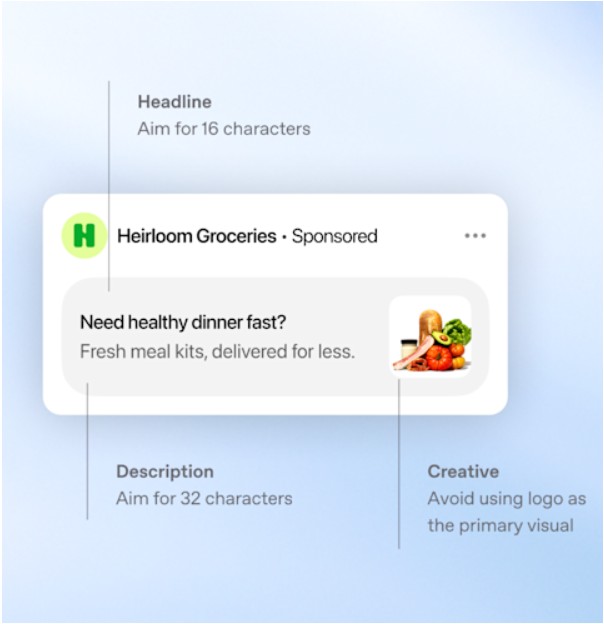
Ads appear below conversations once an exchange reaches a natural pause. Each unit contains six elements: advertiser name, favicon (logo), title, copy (description), landing page URL, and an image.
Character limits are strictly enforced. Titles: 16–24 characters recommended, 50 maximum. Copy: 32–48 characters recommended, 100 maximum. Images must be square PNG or JPG, no larger than 1,200 × 1,200 pixels, at a publicly accessible URL. OpenAI's crawler (OAI-AdsBot) must reach both the image and the landing page — blocking it prevents serving.
Account Setup: Five Steps
Campaigns cannot deliver until all five stages are complete.
- Create your account. Go to ads.openai.com and sign in with an OpenAI account or create one during the flow.
- Complete account information. In Settings → Account Info, set your account name and logo — these appear in every ad unit. Timezone, currency, business country, and onboarding details cannot be changed after creation. Verify everything carefully.
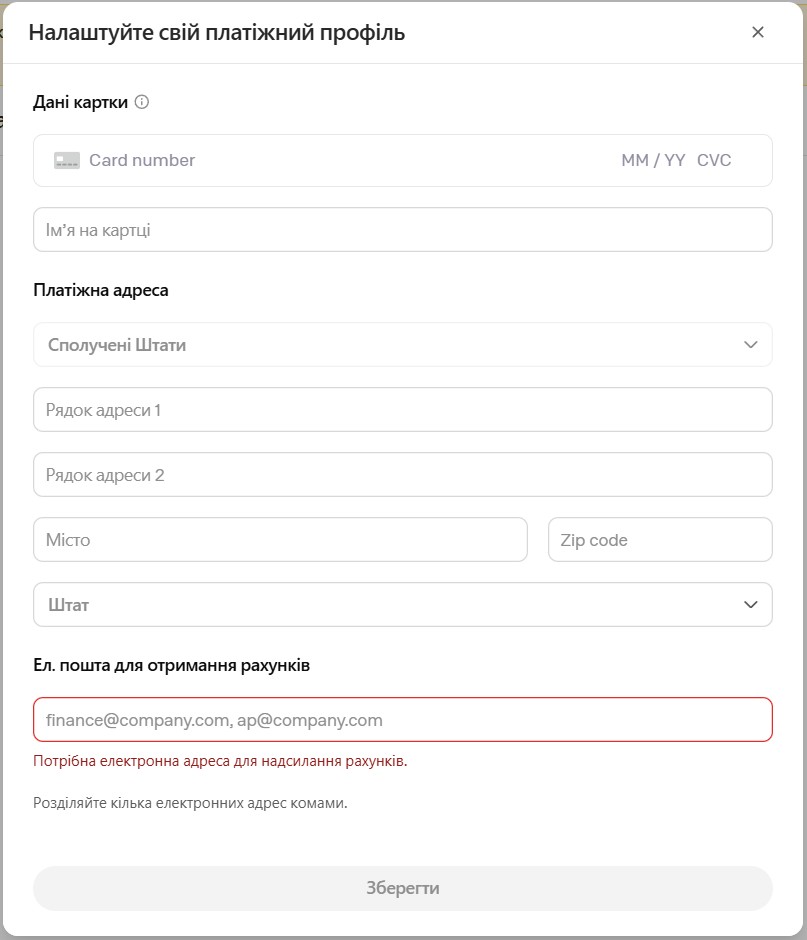
- Set up billing and payment. Create a billing profile (business name, address, invoice email) and add a credit card. Both must be complete before campaigns can run.
- Complete account verification. Answer questions about your business in Ads Manager Beta. OpenAI reviews eligibility under their Ads Policies. A green banner confirms approval.
- Invite team members. Go to Settings → Users → Invite. Each advertiser you manage requires its own account.
Pricing and Auction Mechanics
Two buying models are available.
CPM (Views objective) optimises for reach. The default maximum bid is $60 CPM.
CPC (Clicks objective) optimises for traffic. The recommended starting bid is $3–5 per click.
The auction is relevance-weighted and second-price: the winner pays just above the second-highest bid, and relevance affects who wins. A well-matched ad can beat a higher bidder with weaker conversational alignment. Writing specific, useful ads is a genuine competitive advantage.
Campaign Structure
All campaigns follow a three-level hierarchy: Campaign → Ad Group → Ad.
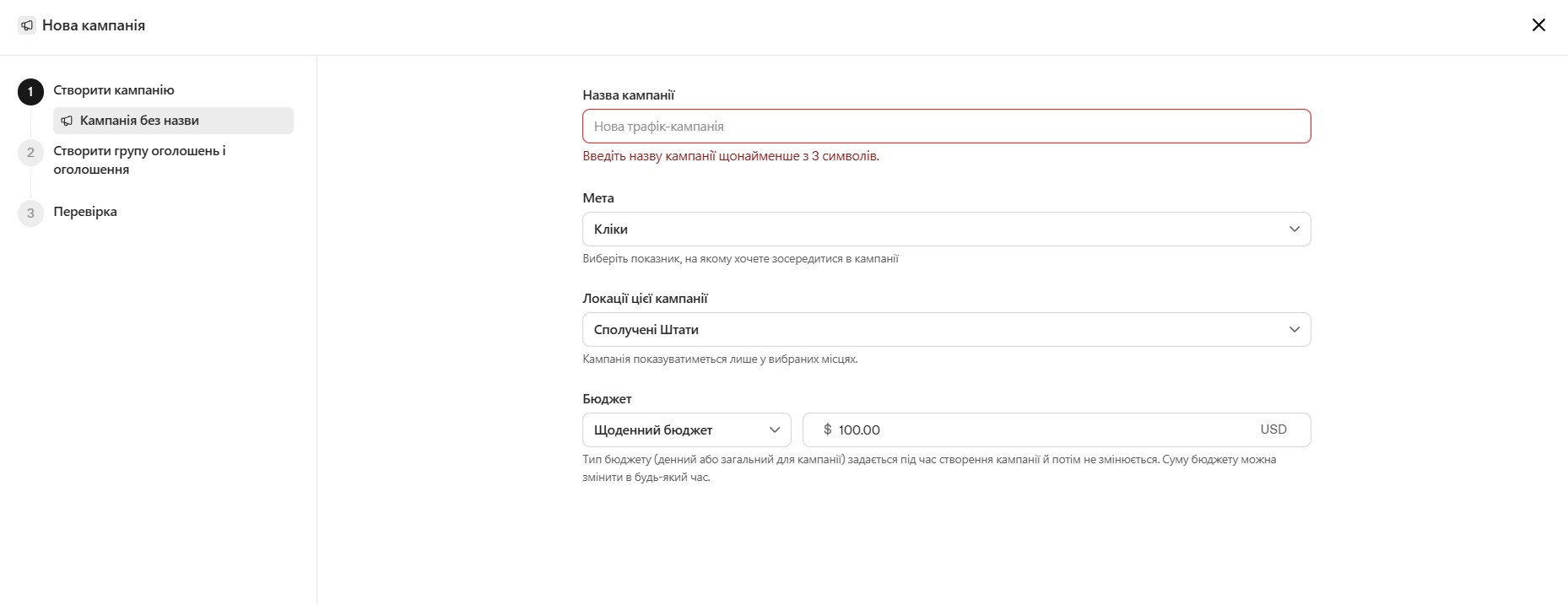
Campaign defines objective, budget, dates, and target countries. Use separate campaigns for different products, regions, or seasonal initiatives.
Ad Group organises ads around a shared theme. The central element is context hints — descriptions of the conversations and user needs where your ads should appear. These are thematic signals, not exact keywords. Write them as user questions ("comparing accounting software for freelancers"), not keyword lists. For Clicks campaigns, set the maximum CPC bid at this level.
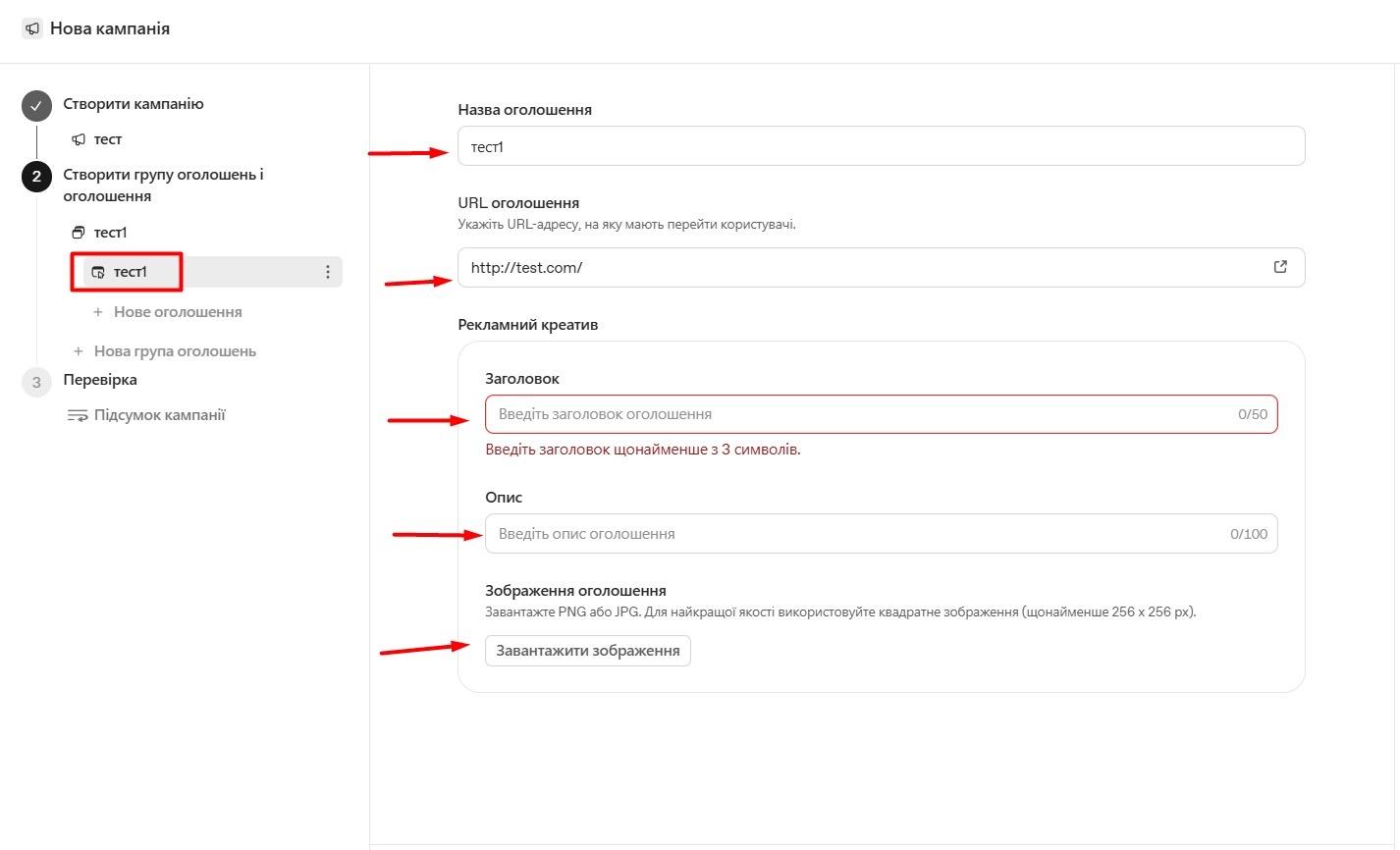
Ad is the individual creative: title, copy, image, and landing page. Include multiple distinct variations per ad group. Limits per account: 5,000 campaigns, 5,000 ad groups, 5,000 ads.
Writing Ads for a Conversational Context
ChatGPT ads enter conversations that may already detail a user's exact situation. Ads that perform are those that feel genuinely useful at that moment.
Titles should communicate value precisely. Prefer specific, informative language — "Accounting software for UK freelancers" — over vague phrases like "The best financial solution."
Copy should add new information, not restate the title. Expand on a benefit, name a use case, or highlight a differentiator.
Images should be clean, simple, and consistent with the message. Treat title, copy, and image as a single unified creative.
Landing pages should point to the most relevant specific page — not the homepage. Add UTM parameters directly to the URL for analytics tracking.
Volume matters. Genuinely distinct variations — each with a different angle — allow the system to match ads across more conversation types.
Launching a Campaign: Step by Step
Two creation methods are available.
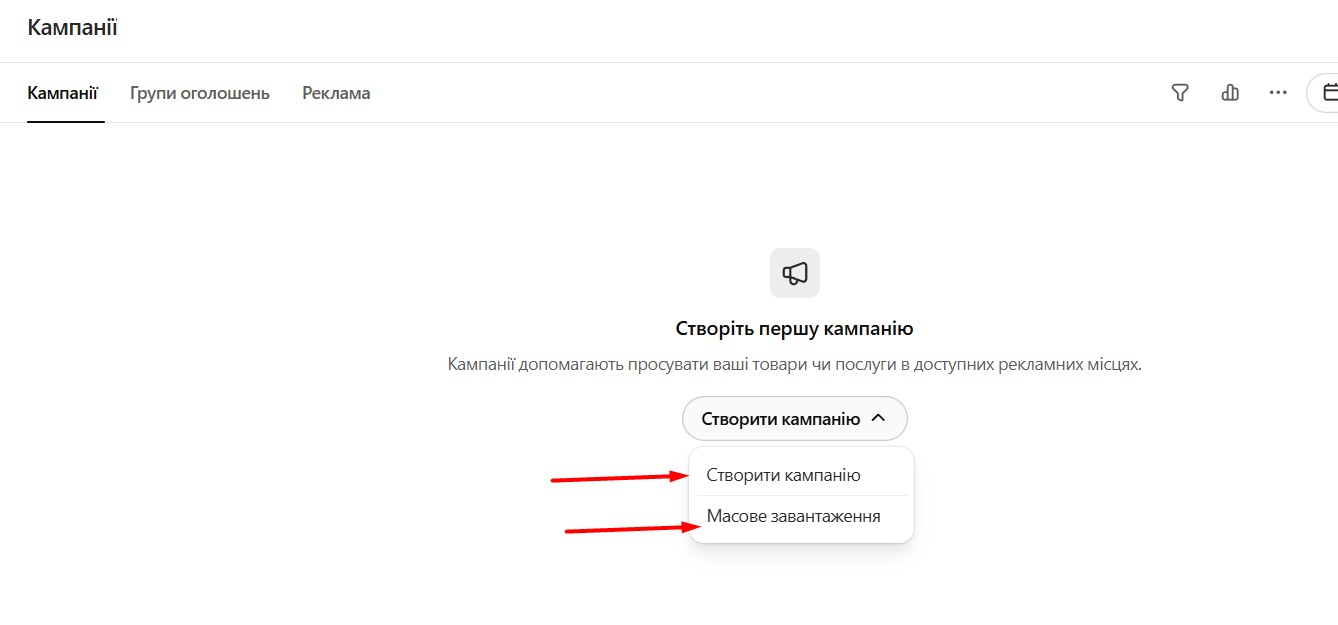
Guided creation walks through each level inside Ads Manager Beta. Click Create → Create Campaign, complete the required fields for the campaign, ad group, and ads, then set the status to Active to submit for review.
Bulk upload via CSV suits larger launches. Download the ad schema template from Create → Upload Bulk. It has three tabs — Campaigns, Ad Groups, Ads — one row per object. Names must match exactly across tabs. Context hints use JSON array format: ["hint one", "hint two"] .
Before uploading, check: required fields are complete; names match across tabs; character limits are met; landing pages are reachable; image URLs are publicly accessible PNG or JPG within size limits.
After submission, campaigns typically receive impressions within 24 hours. Allow up to seven hours for results to appear in the dashboard. If an ad shows "Not serving," hover over the status for the specific reason.
Measuring and Optimising Performance
Ads Manager Beta tracks seven metrics at every level: impressions, clicks, spend, CTR, average CPC, average CPM, and conversions (when conversion measurement is set up).
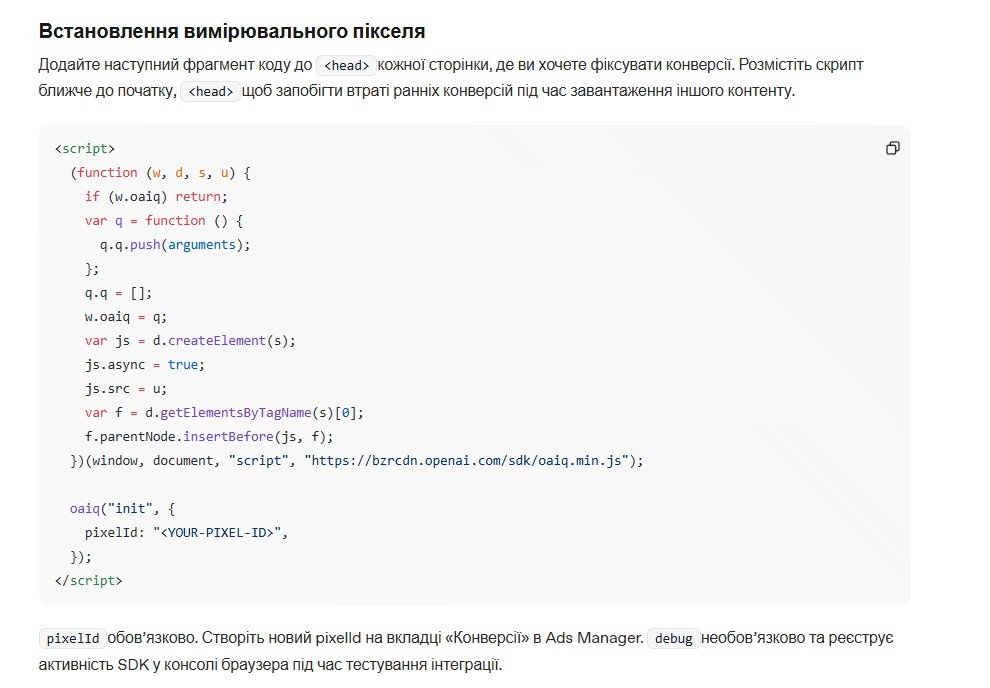
Reports are available as a table view, chart view for trends, and CSV export with daily or cumulative data. Set up conversion measurement in the platform and add UTM parameters to landing page URLs — they persist through ad clicks and connect to standard tools including GA4.
For quick changes, use inline edits. For changes at scale, use the bulk edit workflow: select objects, export for edit, modify the file, and re-upload.
Optimisation cycle: launch → gather data → pause underperformers → iterate on what works.
Who Should Start, and Where to Begin
ChatGPT Ads works best for products where decisions involve research and comparison: software, financial services, education, professional services, and higher-consideration consumer goods. In these categories, users are actively evaluating options — a relevant, informative ad adds value rather than interrupting.
The relevance-weighted auction lets smaller advertisers with strong creatives compete against larger budgets. Brand safety is built in: ads do not appear in sensitive conversation contexts.
To launch, you need four things: an account at ads.openai.com, prepared creatives (title, copy, image, landing page), a test budget, and conversion tracking in place. The fundamentals that determine success — relevance, specificity, and genuine usefulness — are the same ones that have always defined effective advertising.


