


Інтернет-магазин на Laravel – це індивідуально розроблена система онлайн-продажів, у якій технічна логіка сайту підлаштовується під реальні процеси компанії: як формується каталог, як покупець оформлює замовлення, як менеджер працює із заявками, як оновлюються дані про товари та як сайт готується до SEO-просування.
Laravel обирають тоді, коли готова CMS або конструктор уже обмежують розвиток магазину. Це стосується проєктів, де потрібна гнучка структура, чистий код без зайвих модулів, висока швидкість, зручне адміністрування, інтеграція з внутрішніми системами компанії та можливість розширювати сайт без повної переробки.
У SEO-Evolution ми працюємо з Laravel як з основою для складних комерційних сайтів, де важливі не лише дизайн і програмування, а й пошукова видимість, стабільність, аналітика та подальший розвиток. Детальніше про цей напрям можна переглянути на сторінці Laravel-розробки .
Що таке Laravel?
Laravel – це сучасний PHP-фреймворк для створення сайтів і вебсистем зі складною внутрішньою логікою. Його використовують не як готовий магазин із коробки, а як основу для індивідуальної розробки: команда сама проєктує структуру даних, правила роботи сайту, адміністративну частину, сценарії користувачів і технічні можливості для подальшого розвитку.
Для інтернет-магазину це означає, що бізнес не прив’язаний до стандартних модулів готової CMS. На Laravel можна побудувати сайт під конкретну модель продажів: з власною логікою каталогу, зручним керуванням товарами, окремими правилами для різних типів клієнтів, чистішим кодом і точнішим контролем над технічною частиною SEO.
Перед стартом розробки ми перевіряємо актуальну версію фреймворку, вимоги до PHP і строки підтримки. Для цього використовуються офіційні release notes Laravel – сторінка з інформацією про нові версії, технічні вимоги, виправлення помилок і період безпекових оновлень. Офіційні release notes Laravel допомагають не закладати в новий проєкт застарілу технічну основу.
На чому робити інтернет-магазин: Laravel, CMS чи конструктор?
Платформу для інтернет-магазину потрібно вибирати за задачею, а не за популярністю. Для швидкого запуску невеликого каталогу може вистачити конструктора або готової CMS. Якщо сайт має рости, працювати швидко, підтримувати індивідуальні правила продажів і не залежати від десятків плагінів, Laravel дає більше технічної свободи.
| Рішення | Плюси | Мінуси | Коли обирати |
| Laravel | Гнучка архітектура, індивідуальна логіка, зручна робота з інтеграціями, контроль над SEO, масштабування | Вища вартість старту, довша розробка, залежність від якості технічного завдання і команди | Складний інтернет-магазин, B2B, великий каталог, CRM або ERP, нестандартні правила оформлення замовлення, персональні ціни |
| WordPress + WooCommerce | Швидкий старт, багато готових плагінів, зручне керування контентом, великий ринок спеціалістів | Залежність від плагінів, ризики швидкості й безпеки при неправильній збірці, складна реалізація нетипової логіки магазину | Невеликий або середній магазин, де важливі блог, контент і швидкий запуск |
| OpenCart | Готова логіка для інтернет-магазину, каталог, товари, замовлення, модулі оплати й доставки | Обмеження в кастомізації, залежність від якості модулів, складні доопрацювання нестандартних сценаріїв | Стандартний інтернет-магазин із типовим каталогом і зрозумілою логікою продажів |
| Magento / Adobe Commerce | Потужна платформа для великих каталогів, складних правил і масштабних магазинів | Високі вимоги до бюджету, сервера, команди розробки і підтримки | Великі проєкти інтернет-торгівлі з ресурсами на складну платформу і довгостроковий розвиток |
| Конструктор сайту | Найшвидший запуск, просте керування, мінімальний технічний вхід | Обмеження в SEO, швидкості, інтеграціях, структурі каталогу і розвитку функціоналу | Тест ніші, невелика вітрина, старт продажів без складної розробки |

Перед вибором платформи оцініть не тільки запуск, а й подальший розвиток: чи зручно буде розширювати сайт, змінювати правила продажів, додавати нові розділи, підключати зовнішні сервіси й підтримувати нормальну швидкість без технічного перевантаження.
Коли інтернет-магазину потрібен Laravel
Laravel потрібен інтернет-магазину, коли стандартної логіки готової платформи вже недостатньо. Це не питання розміру бізнесу. Малий магазин теж може мати складні процеси, а великий проєкт іноді працює за досить типовою схемою. Головний критерій – наскільки сайт має підлаштовуватися під ваші правила продажів, обліку, обробки замовлень і розвитку.
Цей фреймворк добре підходить для проєктів, де потрібне індивідуальне технічне рішення: власна логіка каталогу, різні сценарії для клієнтів, інтеграція з обліковими системами, гнучке керування цінами, швидкий сайт без зайвих модулів і можливість поступово розширювати функціонал.
- сайт має працювати за власними правилами продажів, а не підлаштовуватися під готовий модуль;
- каталог потребує гнучкої структури, фільтрів, варіацій товарів і SEO-сторінок;
- потрібна інтеграція з CRM, складом, оплатою, доставкою або ERP – системою обліку та управління ресурсами компанії;
- проєкт має розвиватися без технічних обмежень готової CMS.
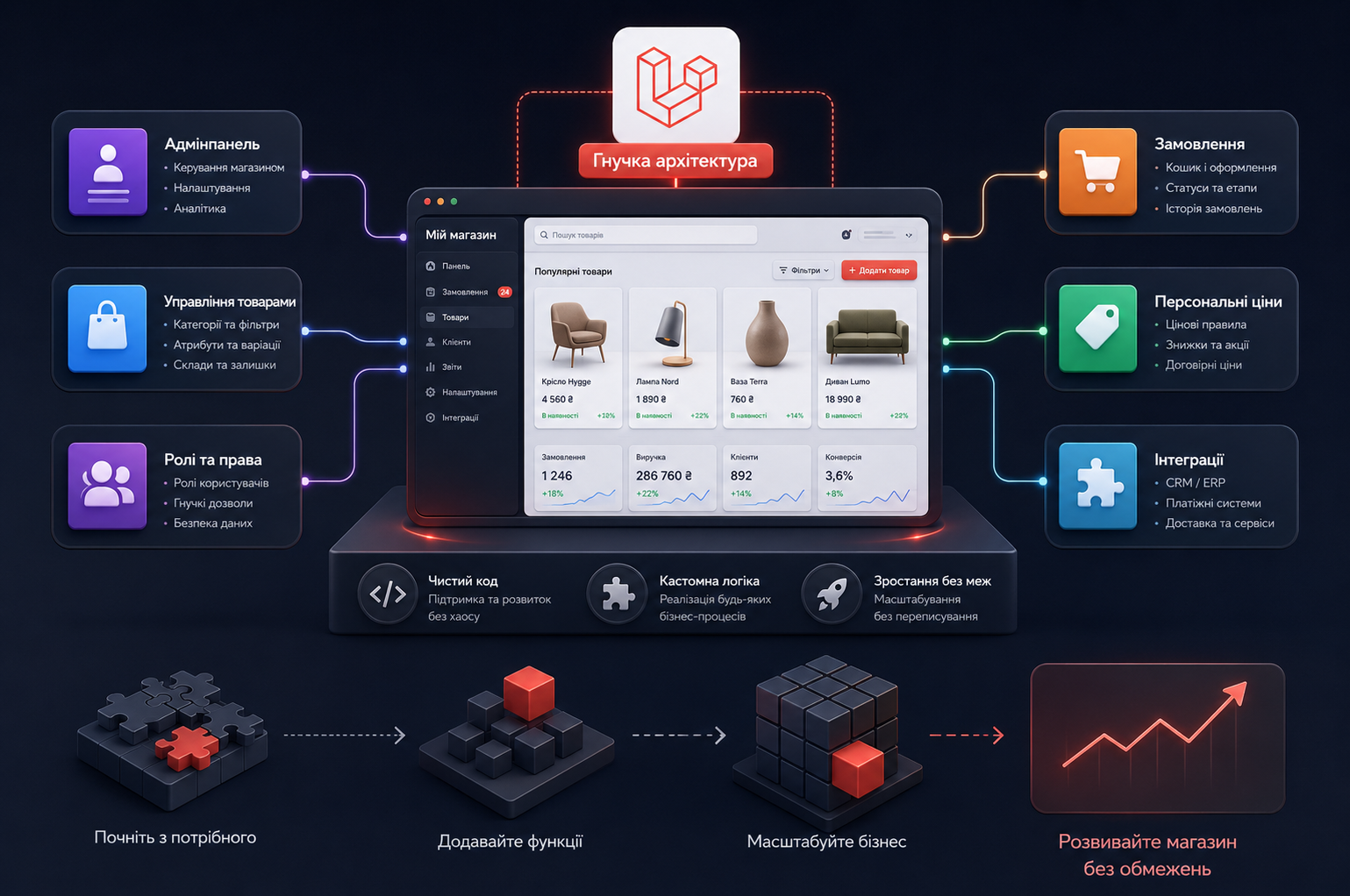
Переваги інтернет-магазину на Laravel
Головна перевага Laravel для інтернет-магазину – контроль над технічною логікою сайту. Розробники не збирають проєкт із випадкових модулів, а створюють систему під конкретну структуру бізнесу. Це дає чистіший код, менше зайвого функціоналу, кращу керованість і більше можливостей для розвитку.
Гнучка архітектура магазину
На Laravel можна спроєктувати сайт так, щоб він відповідав процесам компанії: від структури товарів до правил обробки замовлень. Це зручно для магазинів, які поступово розширюють асортимент, додають нові канали продажів або працюють з різними типами клієнтів.
Чистіший код і менше зайвого
У готових CMS сайт часто обростає плагінами, частина яких дублює функції або додає непотрібне навантаження. У Laravel-проєкті функціонал розробляється під задачу, тому легше контролювати швидкість, безпеку, логіку сторінок і подальшу підтримку.
Зручне адміністрування
Адмінпанель можна зробити під реальну роботу менеджерів: залишити потрібні поля, прибрати зайве, налаштувати ролі доступу, спростити редагування товарів і прискорити обробку замовлень. Це важлива перевага для команд, які щодня працюють із каталогом.
Розвиток без повної переробки
Laravel добре підходить для поетапного розвитку. Після запуску можна додавати нові розділи, сервіси, інтеграції, кабінети, правила ціноутворення або внутрішні інструменти, не змінюючи всю платформу з нуля.
SEO для інтернет-магазину на Laravel
Laravel SEO – це можливість правильно реалізувати технічну основу для пошукового просування. Фреймворк не просуває сайт автоматично, але дає розробникам свободу створити SEO-можливості без обмежень готових модулів.
Що закласти в SEO при розробці інтернет-магазину на Laravel? На етапі технічного завдання потрібно описати не тільки метатеги, а й правила індексації, структуру URL, мікророзмітку, роботу з фільтрами, швидкість сторінок і можливості редагування SEO-даних через адмінпанель.
| SEO-зона | Що передбачити в інтернет-магазині на Laravel |
| URL і структура | Логічні ЧПУ для категорій, підкатегорій, товарів, брендів, фільтрів і службових сторінок |
| Метатеги | Редагування Title, Description, H1, SEO-текстів і шаблонів метаданих через адмінпанель |
| Індексація | Керування canonical, noindex, robots.txt, sitemap.xml, пагінацією і фільтрами |
| Мікророзмітка | Product, BreadcrumbList, Organization, LocalBusiness, Review або інші типи schema.org відповідно до змісту сторінок |
| Швидкість | Оптимізація шаблонів, кешування, зображень, JavaScript, CSS, серверної відповіді і Core Web Vitals |
| Каталог | Контроль індексованих фільтрів, сторінок сортування, пагінації, товарів без наявності й посадкових сторінок |
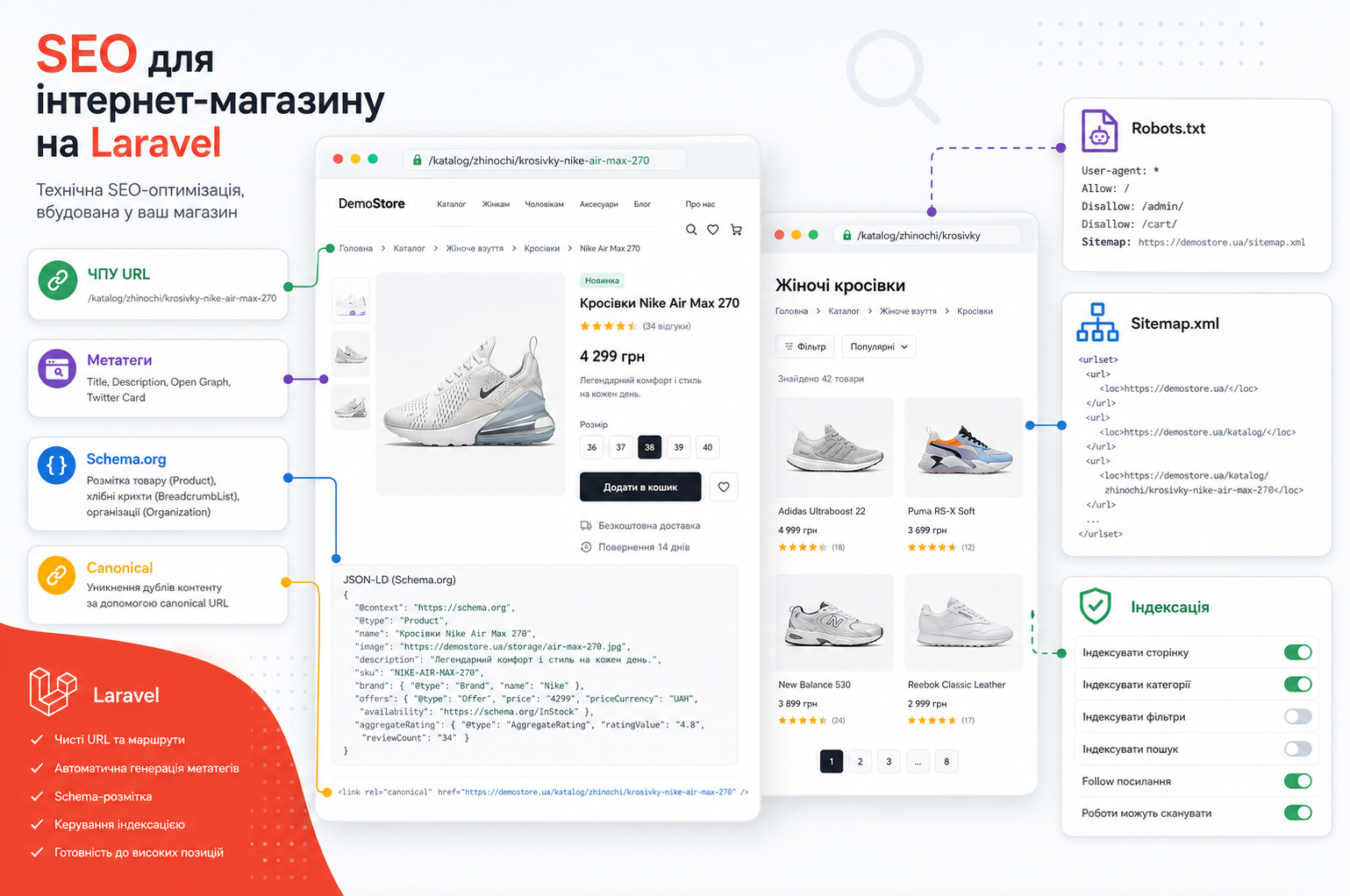
У своїх проєктах інтернет-магазинів ми обов’язково перевіряємо, чи правильно реалізована мікророзмітка товарів. Product structured data допомагає пошуковим системам точніше розуміти ціну, наявність, рейтинг, доставку, повернення та інші дані про товарну сторінку. Рекомендації Google щодо Product structured data підтверджують, які властивості потрібно передавати для товарів і комерційних сторінок.
Для категорій і вкладених розділів важливі хлібні крихти. Google може використовувати BreadcrumbList у результатах пошуку, щоб краще показувати місце сторінки в структурі сайту. Рекомендації Google щодо BreadcrumbList потрібно врахувати для великих каталогів.
У блозі SEO-Evolution є окремий матеріал про мікророзмітку schema.org . Перегляньте його перед підготовкою технічного завдання, якщо плануєте SEO-просування інтернет-магазину після запуску.
Швидкість і Core Web Vitals
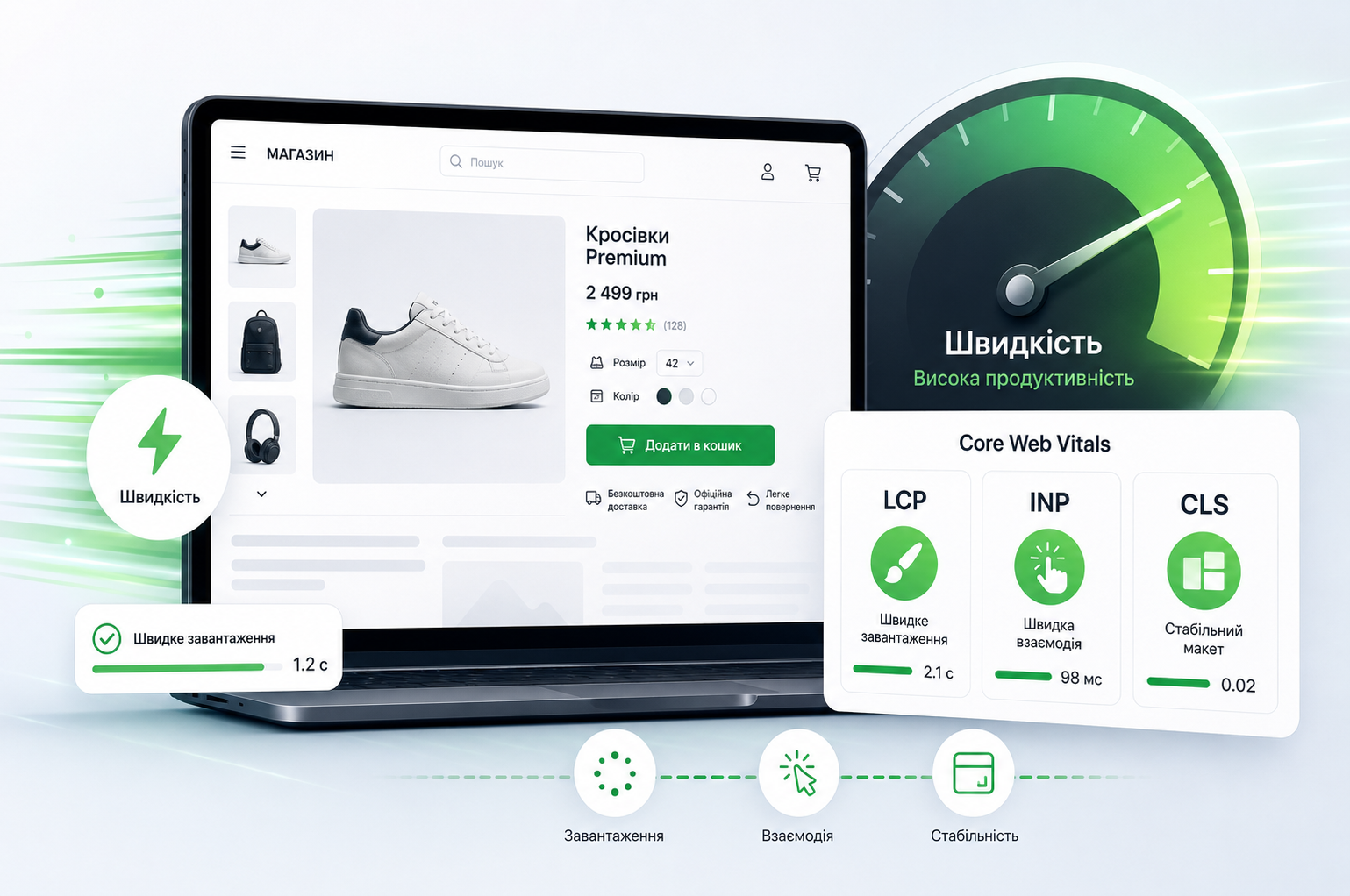
Інтернет-магазин на Laravel може показувати високу швидкість, якщо проєкт правильно спроєктований. На відміну від багатьох сайтів на CMS, Laravel не потребує великої кількості плагінів для базової логіки магазину. Це дозволяє зробити чистіший код, прибрати зайве навантаження і точніше контролювати роботу сторінок.
Для SEO важливо контролювати Core Web Vitals: LCP, INP і CLS. Ці метрики показують, як швидко завантажується основний контент, наскільки швидко сторінка реагує на дії користувача і чи не зміщуються елементи під час завантаження. Google Search Central пояснює їх як показники реального користувацького досвіду.
У Laravel-проєктах SEO-Evolution швидкість враховується ще на етапі архітектури: ми перевіряємо структуру шаблонів, роботу фільтрів, обробку зображень, кешування, фонові задачі та зайві скрипти, які можуть сповільнювати каталог або сторінки товарів.
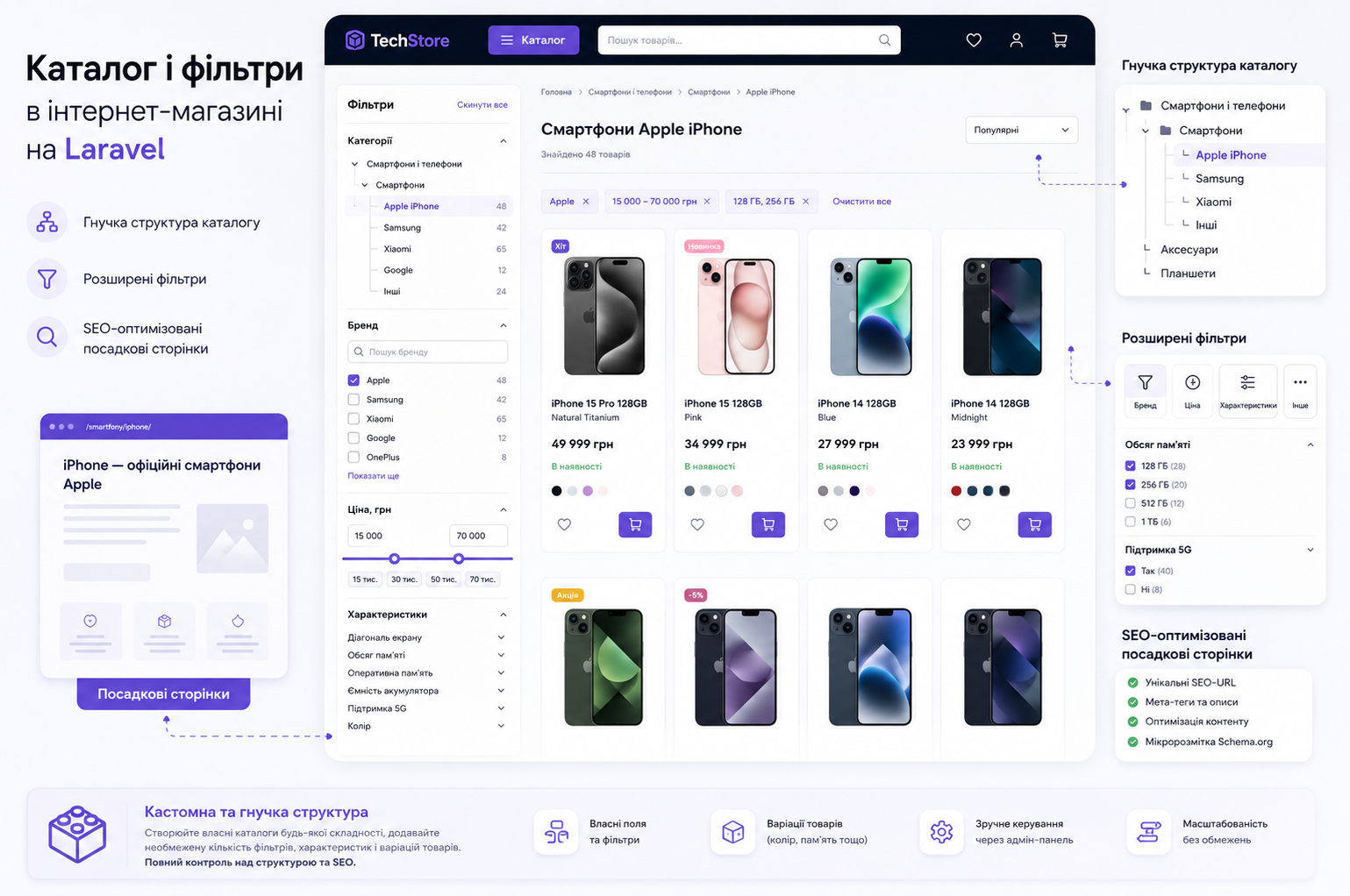
Каталог і фільтри в інтернет-магазині на Laravel
Каталог – одна з головних причин обирати Laravel для інтернет-магазину. У готовій CMS структура товарів часто залежить від можливостей модуля. На Laravel каталог можна спроєктувати під реальний асортимент: категорії, бренди, характеристики, варіації, фільтри, акції, посадкові сторінки і правила індексації.
Для SEO це критично. Якщо не продумати каталог до старту розробки, сайт може отримати дублікати сторінок, хаотичні URL, зайві індексовані фільтри або важливі категорії без посадкових сторінок. Такі помилки дуже типові для готових CMS і х складно виправляти після запуску, бо вони вже пов’язані з базою даних, шаблонами, маршрутизацією і sitemap.xml.
У SEO-Evolution ми проєктуємо каталог разом із SEO-структурою: визначаємо, які сторінки мають просуватися в пошуку, які фільтри залишаються тільки для користувача, як формуються URL і як внутрішня перелінковка допомагає розподіляти вагу між категоріями, товарами та інформаційними сторінками.
Етапи розробки інтернет-магазину на Laravel
Поетапна розробка сайту на Laravel починається з технічного завдання. У ньому потрібно зафіксувати вимоги до структури, дизайну, каталогу, адмінпанелі, оплати, доставки, інтеграцій, SEO, аналітики, тестування і приймання робіт. Це допомагає зрозуміти обсяг проєкту до старту програмування.
Для підготовки такого документа перегляньте нашу статтю про технічне завдання на розробку сайту та інтернет-магазину . Там розібрано, які вимоги потрібно описати перед передачею проєкту в розробку.
Нижче – коротка структура етапів, яку зручно використовувати для оцінки Laravel-проєкту і пояснення процесу розробки інтернет-магазину з нуля.
| Етап | Що робиться |
| Аналіз задачі | Вивчаються бізнес-процеси, товари, аудиторія, конкуренти, джерела трафіку, обмеження і цілі сайту |
| Структура магазину | Проєктується каталог, категорії, фільтри, картка товару, кошик, оформлення замовлення, службові сторінки і URL |
| Прототип і дизайн | Готуються ключові сценарії користувача, логіка інтерфейсу, мобільна версія і дизайн сторінок |
| Програмна логіка та інтерфейс | Розробляється Laravel-логіка сайту, адмінпанель, база даних, шаблони сторінок, форми, кошик і оформлення замовлення |
| Інтеграції | Підключаються CRM, оплата, доставка, склад, аналітика, рекламні конверсії, email або SMS-сервіси |
| SEO і тестування | Перевіряються метатеги, sitemap.xml, robots.txt, canonical, schema.org, швидкість, форми, оформлення замовлення і події GA4 |

Чи можна створити сайт на Laravel самостійно?
Створити навчальний сайт на Laravel самостійно реально. Для цього потрібно розібратися з PHP, базами даних, встановленням Laravel, командами Artisan, моделями, маршрутами, контролерами і шаблонами Blade. Це нормальний шлях для розробника, який вивчає фреймворк.
З інтернет-магазином ситуація складніша. Тут недостатньо вивести список товарів на сторінку. Потрібно продумати, як сайт зберігає дані, як покупець оформлює замовлення, як менеджер працює з ним в адмінпанелі, як підключається оплата, як оновлюються залишки, як захищаються дані користувачів і як усе це перевіряється перед запуском.
Самостійна розробка підходить для навчання або невеликого експерименту. Комерційний інтернет-магазин на Laravel потребує команди, бо виправлення помилок в архітектурі, безпеці, SEO або обробці замовлень можуть коштувати дорожче, ніж професійна розробка з самого початку.
Скільки коштує інтернет-магазин на Laravel?
Вартість інтернет-магазину на Laravel залежить не від самого фреймворку, а від складності проєкту. Простий каталог із замовленням і великий магазин із персональними цінами, інтеграціями, багатомовністю, імпортом товарів і складною адмінпанеллю потребують різного обсягу роботи.
На ціну найбільше впливають три речі: структура магазину, кількість індивідуального функціоналу і вимоги до інтеграцій. Дизайн, SEO, швидкість, аналітика й тестування теж потрібно враховувати одразу, бо вони впливають не тільки на бюджет, а й на якість запуску.
Щоб отримати реалістичну оцінку, підготуйте опис проєкту, приклади конкурентів, бажану структуру сторінок, список зовнішніх сервісів і вимоги до адміністрування. Після цього команда зможе оцінити не абстрактний сайт на Laravel, а конкретний інтернет-магазин із зрозумілим обсягом робіт.

Кейси SEO-Evolution: Laravel та інтернет-магазини
Портфоліо допомагає зрозуміти, чи має команда досвід у схожих задачах. Для Laravel-розробки це важливо, бо складний інтернет-магазин потребує не тільки дизайну, а й правильної архітектури, стабільної логіки, інтеграцій, SEO і підтримки.
Проєкт Samsonite показує досвід тривалої роботи з великим брендом, де важливі стабільність, технічний розвиток, інтерфейс і підтримка сайту протягом років.
Для Tataki команда SEO-Evolution створила сайт доставки їжі з нуля. Це приклад Laravel-проєкту, де важливі форма замовлення, кабінет клієнта і логіка сервісу.
AttributeTime – інтернет-магазин брендових годинників та аксесуарів з індивідуальним дизайном і повною розробкою. Такий формат ближчий до задач, де бізнесу потрібен кастомний інтернет-магазин, а не стандартна вітрина.
Більше прикладів доступно в портфоліо SEO-Evolution . Перегляньте кейси перед тим, як замовити сайт на Laravel або інтернет-магазин під ключ.
Коли варто замовляти інтернет-магазин на Laravel
Замовляти інтернет-магазин на Laravel має сенс, коли бізнесу потрібне індивідуальне рішення, а не готовий шаблон. Laravel дає більше свободи в розвитку: сайт можна масштабувати, розширювати функціонал, підключати нові сервіси, оптимізувати швидкість і зберігати зручне адміністрування без технічного перевантаження.
Якщо вам потрібна розробка інтернет-магазину з продуманою структурою, SEO-основою, швидкою роботою та можливістю розвитку, зверніться до SEO-Evolution. Ми допоможемо оцінити задачу, підготувати технічну логіку проєкту і вибрати рішення під реальні цілі бізнесу.
FAQ про Laravel для інтернет-магазину
Laravel це CMS чи фреймворк?
Laravel – це фреймворк, а не CMS. CMS дає готову адміністративну систему, шаблони і модулі. Laravel дає основу для індивідуальної розробки, де команда проєктує структуру сайту, базу даних, адмінпанель, функціонал, інтеграції й SEO-можливості.
Чи підходить Laravel для інтернет-магазину?
Laravel підходить для інтернет-магазину, якщо проєкт має складну логіку, великий каталог, інтеграції, особисті кабінети, нестандартне оформлення замовлення або вимоги до масштабування. Для простого магазину без складних задач можна розглянути готову CMS.
Чи хороший Laravel для SEO?
Laravel хороший для SEO тоді, коли SEO-вимоги закладені в архітектуру сайту. Потрібно передбачити ЧПУ, метатеги, canonical, sitemap.xml, robots.txt, BreadcrumbList, Product schema, швидкість, мобільну версію і контроль індексації фільтрів.
Що краще для інтернет-магазину: Laravel чи OpenCart?
OpenCart підходить для стандартного магазину з типовою логікою. Laravel краще обирати для кастомного інтернет-магазину, де потрібні нестандартні бізнес-процеси, інтеграції, особисті кабінети, B2B-функціонал, масштабування і повний контроль над архітектурою.
Скільки коштує інтернет-магазин на Laravel?
Ціна залежить від каталогу, дизайну, інтеграцій, кабінетів, оформлення замовлення, SEO-вимог, імпорту товарів, багатомовності, аналітики і підтримки. Точну оцінку можна підготувати після аналізу структури, функціоналу і технічного завдання.
Висновок
Laravel підходить для інтернет-магазинів, яким потрібна гнучка технічна основа, чистий код, швидка робота, зручне адміністрування і можливість розвитку без обмежень готової платформи. Це не універсальна відповідь для кожного магазину, але сильне рішення для проєктів, де сайт має рости разом із бізнесом.
Головне – оцінювати не сам фреймворк, а задачу, яку має вирішувати інтернет-магазин. Якщо стандартна CMS обмежує логіку продажів, швидкість, структуру каталогу або подальші доопрацювання, Laravel дає більше контролю над технічною основою сайту.
SEO-Evolution допомагає бізнесу створювати сайти та інтернет-магазини з урахуванням розробки, SEO, швидкості, аналітики й подальшої підтримки. Перегляньте наші послуги або портфоліо, щоб оцінити підхід до реальних проєктів.


