


Позиції сайту в Google не завжди виглядають однаково для всіх користувачів. Людина в Києві, Харкові, Львові чи Варшаві може побачити різну видачу за одним і тим самим запитом. Особливо це помітно в локальних тематиках: послуги, медицина, доставка, кафе, ремонти, навчання, юридична допомога, нерухомість.
Тому перевірка позицій сайту не зводиться до простого запиту у своєму браузері. Якщо ви дивитесь результат тільки зі свого комп’ютера, під своїм акаунтом Google і зі своєї IP-адреси, ви бачите не об’єктивну картину, а одну з можливих версій пошукової видачі.
У побуті це часто називають рейтингом сайту в Google. Точніше говорити про позиції сторінок у видачі за конкретними запитами, містами, пристроями та типами результатів. Для SEO це важливо: одна справа бути в топі за інформаційним запитом по всій країні, і зовсім інша — показуватися в локальному блоці для користувача, який шукає послугу поруч із собою.
Головне — не змішувати різні задачі: разово подивитися SERP, перевірити місце сторінки за конкретним запитом і вести регулярний моніторинг. Для кожного сценарію потрібен свій інструмент, інакше легко зробити неправильний висновок з однієї випадкової видачі.
Чому видача Google різна
Google враховує місцезнаходження користувача, бо в багатьох запитах локальний результат справді корисніший. Якщо людина шукає стоматологію, кафе, шиномонтаж або курси англійської, їй зазвичай потрібні варіанти поруч, а не компанії з іншого кінця країни.
За офіційною довідкою Google, пошукова система може визначати місцезнаходження за кількома джерелами: геолокацією пристрою, домашньою або робочою адресою в акаунті, попередньою активністю в сервісах Google, IP-адресою та налаштуваннями браузера чи додатків. Детальніше це описано в довідці Google про місцезнаходження в пошуку .
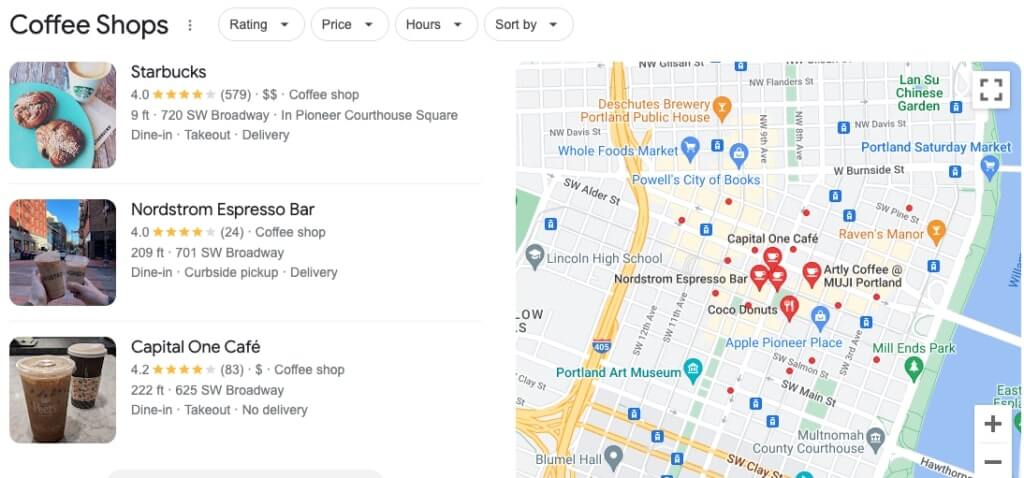
Через це результати пошуку Google можуть відрізнятися навіть у межах одного міста. У центрі, на околиці та в сусідньому районі локальний блок, Google Maps і звичайні органічні результати можуть показувати різних конкурентів.
Для локального бізнесу це критично. Google прямо вказує, що локальні результати залежать переважно від релевантності, відстані та відомості бізнесу. Тому робота з сайтом, профілем компанії, відгуками, локальними сигналами і контентом має йти разом, а не окремими випадковими діями. Якщо потрібна глибша робота саме з локальною видимістю, можна почати з матеріалу про локальну оптимізацію в Google Maps .
Чому ваша видача не завжди показує реальні позиції
Одна з типових ситуацій: власник сайту вводить запит у Google, бачить свій сайт першим і вважає, що все добре. SEO-фахівець перевіряє той самий запит через сервіс — і бачить п’яту або десяту позицію. Клієнт в іншому районі міста може побачити ще іншу картину.
Так відбувається не тому, що хтось перевіряє неправильно. Просто Google враховує багато сигналів: акаунт, історію пошуку, cookies, мову браузера, пристрій, IP-адресу, попередні кліки, локацію та тип результату. Інкогніто частково прибирає персоналізацію, але не робить видачу повністю нейтральною.
Тому погана ідея — показувати клієнту один скріншот із браузера і називати його реальною позицією сайту. Це лише один зріз, а не картина видимості. Для нормального аналізу потрібні дані за період, група запитів, регіон, пристрій і розуміння, який саме тип видачі перевіряється.
Окремо варто розвести органічну видачу і Google Maps. Сайт може бути в топі органічних результатів, але не потрапляти в локальний блок. І навпаки: профіль компанії може добре показуватися на мапі, хоча сторінка сайту не входить у першу десятку. Для бізнесу це різні джерела видимості, і перевіряти їх треба окремо.
Що саме потрібно перевіряти
Перед тим як шукати інструмент, варто зрозуміти, яку саме задачу ви вирішуєте. Подивитися видачу Google з іншого міста і перевірити позиції сайту — не завжди одне й те саме.
-
Разовий перегляд видачі. Потрібно побачити, які сайти, карти, рекламні оголошення, AI-блоки або локальні результати показуються користувачу в іншому місті.
-
Місце сторінки за конкретним запитом. Потрібно зрозуміти, де сайт показується за фразою, наприклад для Києва, Львова чи Варшави.
-
Регулярна динаміка. Потрібна історія змін: сьогодні, тиждень тому, місяць тому, після оновлення сайту або після запуску SEO-робіт.
-
Видимість сайту в Google. Важлива не одна позиція, а загальна присутність у пошуку: за скількома запитами сайт показується, які сторінки отримують покази, де є просідання, а де росте трафік.
Для разової перевірки вистачить ручних способів. Для SEO-звіту або аналізу просування потрібні Search Console, професійні сервіси перевірки позицій сайту і нормальна сегментація за містами, країнами, сторінками та пристроями.
Який спосіб перевірки вибрати
Універсального методу немає. Інструмент залежить від того, що саме потрібно перевірити: власний сайт, локальну видачу в конкретному місті, рекламу, Google Maps або динаміку позицій за період.
-
Для власного сайту — починайте з Google Search Console. Там видно запити, покази, кліки, CTR і середню позицію за країнами та пристроями.
-
Для швидкого перегляду видачі з іншого міста — використовуйте Valentin.app, Google Ads Preview Tool або ручний запит із назвою міста.
-
Для локального бізнесу в Google Maps — перевіряйте не тільки сайт, а й профіль компанії, локальний блок і видимість на мапі.
-
Для регулярного моніторингу — краще брати rank tracker із налаштуванням міста, країни, мови, пристрою та історією змін.
-
Для технічного тестування геолокації — підійде Chrome DevTools, але не варто використовувати його як основне джерело SEO-позицій.
Search Console для власного сайту
Якщо сайт належить вам або у вас є доступ до проєкту, перше джерело даних — Google Search Console. У звіті ефективності можна дивитися кліки, покази, CTR і середню позицію за запитами, сторінками, країнами, пристроями та типами пошуку. Google окремо пояснює, що середня позиція — це позиція найвищого результату вашого сайту в конкретному наборі даних, а не статичне місце в одній і тій самій видачі для всіх користувачів.
Саме тому Search Console не варто читати як просту таблицю рейтингу. Якщо за запитом середня позиція 8, це не означає, що кожен користувач у кожному місті бачить сайт восьмим. Це усереднене значення за різними показами, пристроями, регіонами та варіантами видачі.
Для практичної перевірки краще діяти так:
-
відкрити звіт Ефективність у Google Search Console;
-
відфільтрувати потрібну сторінку або групу сторінок;
-
подивитися запити, за якими сторінка отримує покази;
-
окремо перевірити країну, тип пристрою і динаміку за датами;
-
порівняти середню позицію з фактичною видачею через інші інструменти.
Для базового налаштування можна використати інструкцію як правильно налаштувати Google Search Console . Якщо дані в консолі є, але незрозуміло, чому сторінки не ростуть або не дають кліків, це вже питання не лише позицій, а повноцінного технічного SEO-аудиту сайту .
Як подивитися видачу з іншого міста вручну
Ручна перевірка корисна, коли потрібно швидко подивитися, як виглядає SERP для іншого міста або країни. Але вона не має замінювати регулярний моніторинг, особливо якщо йдеться про звітність, оцінку SEO-робіт або порівняння з конкурентами.
Перший спосіб — змінити регіон пошуку в налаштуваннях Google. Це допомагає подивитися результати для іншої країни, але не завжди показує видачу так, ніби користувач фізично перебуває в конкретному районі конкретного міста. Для локального SEO цього часто недостатньо.
Другий спосіб — додати місто до самого запиту. Наприклад, не просто ремонт ноутбуків, а ремонт ноутбуків Львів. Не курси англійської, а курси англійської Київ. Не SEO аудит, а SEO аудит сайту Київ. Такий підхід допомагає зрозуміти, які сторінки Google вважає релевантними саме для геозапиту.
Третій спосіб — використовувати URL-параметри, зокрема near із назвою міста. У старих інструкціях цей метод часто подавали як швидке рішення для локальної видачі. Він іноді може змінювати вигляд результатів, але це не офіційна і не стабільна основа для SEO-звітів.
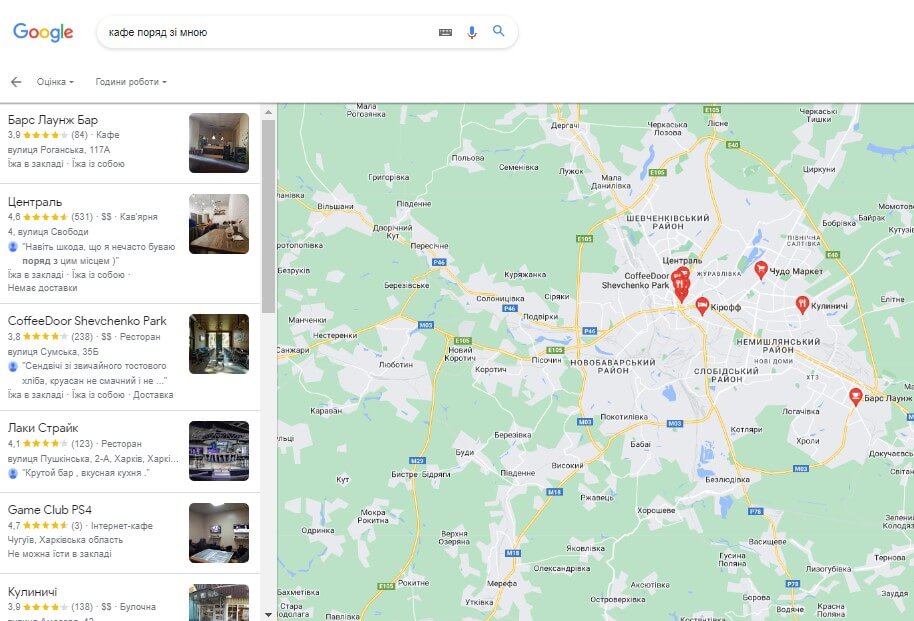
Якщо потрібна точніша перевірка за містом, краще використовувати Google Ads Preview Tool, Valentin.app, LocalFalcon або rank tracker із налаштуванням геолокації.
Google Ads Preview Tool
Google Ads Preview and Diagnosis Tool створений передусім для перевірки рекламних оголошень у пошуку. Але він корисний і для того, щоб подивитися сторінку результатів Google без накручування власних показів реклами. Google прямо зазначає, що цей інструмент дозволяє переглядати, як оголошення виглядає в пошуку, і не впливати на статистику показів.
У ньому можна вибрати запит, країну або локацію, мову та пристрій. Це зручно, коли потрібно перевірити, як виглядає видача для іншого регіону, чи показується реклама, які конкуренти присутні вгорі сторінки і як органічні результати співіснують із платними блоками.
Для SEO цей інструмент не замінює повне відстеження динаміки, але дає хороший контрольний зріз. Особливо якщо ви паралельно ведете рекламу в Google і хочете бачити не тільки органіку, а й рекламне оточення.
Офіційна довідка Google про інструмент доступна тут: Ad Preview and Diagnosis Tool .
DevTools, VPN і Valentin.app
Chrome DevTools дозволяє підмінити геолокацію браузера через панель Sensors. Це корисно для тестування сайтів, які запитують доступ до місцезнаходження користувача: наприклад, показують найближчий магазин, доставку, карту або локальний контент. Офіційна документація Chrome описує цей механізм у матеріалі про емуляцію сенсорів і геолокації .
Для перевірки видачі Google цей спосіб має обмеження. Він не завжди змінює всі сигнали, які Google використовує в пошуку. IP-адреса, акаунт, історія, мова, регіональні налаштування і cookies можуть і далі впливати на результат. Тому DevTools краще використовувати як технічний інструмент для тестування сайту, а не як основний метод SEO-перевірки.
VPN змінює IP-адресу і може допомогти подивитися результати пошуку з іншої країни або великого регіону. Це корисно, якщо потрібно швидко перевірити видачу для Польщі, Німеччини, США чи іншого ринку. Але VPN не дуже точний для міської перевірки. IP у Варшаві ще не означає, що ви бачите видачу так, як її бачить користувач у конкретному районі Варшави.
Valentin.app — простий онлайн-інструмент для перегляду локалізованої видачі Google. Ви вводите ключову фразу, країну, мову й адресу, а сервіс відкриває результати пошуку з урахуванням заданої геолокації. Для швидкої ручної перевірки цього часто достатньо.
Сервіс доступний за посиланням Valentin.app . Він добре підходить для первинної перевірки або пояснення клієнту, чому його власна видача вдома не збігається з даними SEO-звіту. Для регулярної роботи з позиціями все ж потрібні інструменти з історією змін, групами запитів і порівнянням між містами.
Сервіси перевірки позицій
Якщо позиції потрібно відстежувати регулярно, ручні перевірки швидко стають незручними. Сьогодні сайт може бути третім, завтра п’ятим, після оновлення контенту — другим, а в мобільній видачі з іншого міста — за межами першої сторінки. Без історії змін це важко нормально оцінити.
Для моніторингу позицій у Google використовують rank tracker-сервіси. Вони дозволяють задати ключові запити, місто або країну, мову, пристрій, частоту перевірки і групи сторінок. Так можна бачити не одну випадкову видачу, а динаміку.
Для локального SEO окремо корисні інструменти з перевіркою за геосіткою. Наприклад, LocalFalcon показує, як бізнес виглядає в локальній видачі навколо конкретної точки на мапі. Це важливо для Google Maps, сервісних бізнесів і компаній, де відстань до користувача сильно впливає на результат.
Серед інструментів, які використовують для таких задач: BrightLocal , LocalFalcon , Whitespark , Localo , GeoRanker , Sitechecker , ProRankTracker .
Інструмент сам по собі не вирішує SEO-задачу. Важливо не просто зібрати позиції, а зрозуміти, що з ними робити: які сторінки посилити, які запити втратили видимість, де не вистачає локального контенту, а де проблема в технічній оптимізації. Це вже частина системного SEO-просування сайту .
Як зменшити похибку перевірки
Повністю нейтральної видачі Google не існує. Але можна зменшити похибку і не робити висновки на основі випадкового результату.
-
Перевіряйте запити в режимі інкогніто, але не вважайте його абсолютним захистом від персоналізації.
-
Фіксуйте місто, країну, мову, пристрій і дату перевірки.
-
Окремо дивіться органічну видачу, локальний блок, карти, рекламу та AI-блоки, якщо вони з’являються.
-
Не порівнюйте десктоп і мобільну видачу як один і той самий результат.
-
Не робіть висновок про SEO лише за одним запитом. Дивіться групу ключових фраз і сторінок.
-
Порівнюйте ручну перевірку з даними Search Console та rank tracker-сервісів.
Для локальних запитів мобільну видачу варто перевіряти окремо. На телефоні Google частіше показує карти, швидкі дії, маршрути, дзвінки й блоки поруч зі мною, тому позиція на десктопі не завжди відображає реальну видимість бізнесу.
Якщо сайт має покази, але майже не отримує кліків, проблема може бути не тільки в позиціях. Іноді сторінка ранжується за неточними запитами, має слабкий Title або Description, поступається конкурентам у SERP або не відповідає наміру користувача. У такій ситуації варто аналізувати не одну позицію, а всю видимість сайту в Google.
Що робити з результатами перевірки
Подивитися, де показується сайт, — це тільки перший крок. Далі потрібно зрозуміти, чому видача саме така. Якщо сайт не видно в потрібному місті, причина може бути в слабкій локальній сторінці, відсутності релевантних згадок, поганій структурі, недостатній внутрішній перелінковці, технічних помилках або невідповідності контенту запиту.
Для локальних сторінок важливо, щоб текст не був просто шаблонною заміною міста. Google має бачити реальну користь: що саме пропонує компанія в цьому регіоні, кому підходить послуга, які є умови, приклади, уточнення, контакти, зона обслуговування і локальні докази довіри.
Якщо під різні міста потрібні окремі посадкові сторінки, їх краще планувати ще на етапі структури. Інакше сайт швидко перетворюється на набір схожих сторінок, які конкурують між собою або не дають користувачеві нічого нового. У таких випадках важлива не лише оптимізація, а й нормальна розробка сайту з продуманою архітектурою.
Висновок
Щоб подивитися видачу Google з іншого міста, можна використати кілька способів: змінити регіональні налаштування, додати місто до запиту, перевірити SERP через Google Ads Preview Tool, скористатися Valentin.app, VPN, Chrome DevTools або сервісами моніторингу позицій.
Але для SEO важливо не просто побачити іншу видачу. Потрібно правильно інтерпретувати дані: де це разова перевірка, де середня позиція з Search Console, де локальний блок Google Maps, а де реальний моніторинг у Google за містами і пристроями.
Найнадійніший підхід — поєднувати кілька джерел: Search Console для даних по сайту, ручну перевірку для розуміння вигляду SERP, Google Ads Preview або локальні інструменти для географії та rank tracker для регулярної динаміки. Тоді аналіз позицій стає не випадковим пошуком у браузері, а нормальною частиною SEO-аналітики.