


Заявіть про свій бізнес та залучіть більше клієнтів. Дотримуйтесь цих 10 порад, щоб стати більш помітними на Картах Google.
Ви шукаєте місце для обіду в незнайомому районі або вам потрібен механік, щоб допомогти зі спущеною шиною.
Куди ви дивитеся?
Якщо ви відповіли: Google Maps — ви не самотні.
Все більше людей знаходять місцеві компанії через Карти та приймають рішення буквально «на ходу». Тому завдання локального бізнесу просте: зробити так, щоб профіль був точним, корисним і переконливим, а сайт підтверджував ці дані.
Нижче — десять кроків, які зазвичай дають найкращий сумарний ефект: видимість у Maps, більше переходів, дзвінків і запитів маршруту.
1. Заповніть Business Profile
Почніть із бази: підтвердіть і максимально заповніть Google Business Profile (раніше Google My Business). Це один із найсильніших сигналів для локальної присутності: Google очікує, що саме тут дані найбільш актуальні. У довідці Google окремо описано, які сигнали впливають на локальне ранжування (релевантність, відстань, помітність): як Google визначає місцевий рейтинг .
Перевірте обов’язкові блоки:
- назва компанії без «дописів» ключовими словами;
- точна адреса або зона обслуговування (якщо виїздні послуги);
- телефон і сайт;
- години роботи та «спецгодини» (свята/вихідні);
- короткий опис «чим ви корисні» людською мовою;
- атрибути (доступність, опції оплати, формати обслуговування тощо — залежно від ніші).
Якщо профіль ще не створений або потрібна допомога з налаштуванням і валідацією, подивіться послугу: реєстрація компанії в Google Business та на Google Maps .
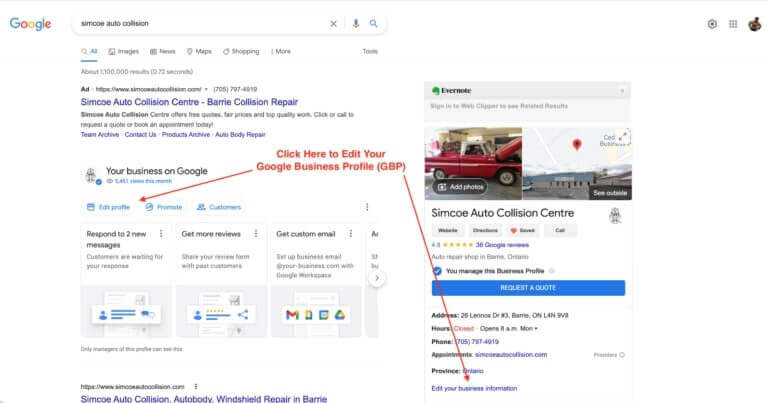
Приклад інтерфейсу Google Business Profile.
2. Оберіть правильні категорії
Категорії — це не «формальність». Вони пояснюють Google, на які запити показувати компанію. Виберіть одну основну категорію максимально точно, а додаткові — лише релевантні. Не намагайтесь «захопити все» — це часто розмиває релевантність.
Польова порада з аудитів SEO-Evolution: якщо ви змінили фокус послуги (наприклад, додали новий напрям), краще оновити категорії та паралельно підтягнути контент на сайті під ці послуги — тоді зміни виглядають логічними, а не «під SEO».
3. Публікуйте оновлення і фото
Після підтвердження профілю робота лише починається. Активні профілі зазвичай збирають більше взаємодій: переглядів, кліків, дзвінків. Регулярно додавайте:
- оновлення (новини, зміни графіка, нові послуги);
- пропозиції, події (якщо доречно);
- фото з реального життя: зал, команда, процес, кейси, «до/після» (де етично і легально).
Є нюанс: Google має правила до контенту в профілі (фото/відео/публікацій), і краще їх знати до того, як щось «вилетить» або не пройде модерацію: вимоги Google до фото та публікацій у профілі .
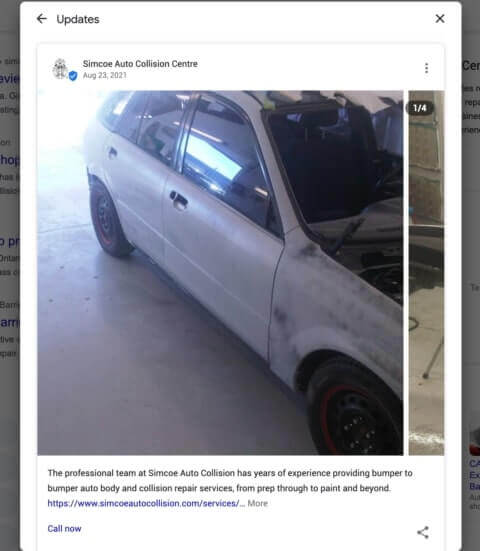
Приклад публікацій у Google Business Profile.
Порада: у кожному пості робіть один чіткий наступний крок — «зателефонувати», «прокласти маршрут», «перейти на сторінку послуги». Посилання краще вести на конкретну сторінку, а не на головну.
4. Посильте локальне SEO сайту
Maps і органіка пов’язані. Профіль може бути ідеальним, але якщо сайт суперечить даним профілю або слабко відповідає на запит користувача — ви програєте конкурентам.
Мінімальний must-have для локального сайту:
- окремі сторінки під ключові послуги;
- контакти з адресою/телефоном, які збігаються з профілем;
- зрозуміла навігація, швидкість, мобільна зручність;
- локальні запити у заголовках і тексті природно, без «переспаму».
Якщо потрібна системна робота: SEO-просування сайту або реклама в інтернеті (коли потрібні швидші ліди).
5. Додайте schema LocalBusiness
Структуровані дані LocalBusiness (JSON-LD) допомагають пошуковику точніше «прочитати» ваші бізнес-дані: адресу, години, контакти, сайт. Це не «чарівна кнопка», але знижує ризик плутанини й підсилює узгодженість сигналів. Офіційні рекомендації Google по LocalBusiness: розмітка LocalBusiness у Google .
Найчастіші помилки, які бачимо під час перевірок: різні телефони на сторінках, стара адреса, години не збігаються з профілем, відсутні відділення/філії, якщо вони є.
6. Вбудуйте Google Map
На сторінці контактів додайте вбудовану карту Google. Це корисно людям (швидко прокласти маршрут), і водночас створює ще одну точку узгодженості між сайтом і профілем.
Якщо сайт потребує оновлення або редизайну під мобільні сценарії «знайшов — подзвонив — приїхав», подивіться напрям: розробка сайтів .
7. Збирайте відгуки правильно
Відгуки — один із найпомітніших факторів довіри для людей і важливий сигнал для локальної видимості. Важливі не лише «зірочки», а й:
- регулярність появи нових відгуків;
- тексти з деталями (що саме сподобалося);
- відповіді бізнесу — особливо на нейтральні й негативні;
- фото від клієнтів (де це доречно).
Важливий нюанс: стимулювання відгуків подарунками/знижками та «накрутка» — погана ідея. Google прямо забороняє фейкову взаємодію, і це може закінчитись обмеженнями для профілю: правила Google щодо забороненого контенту й маніпуляцій .
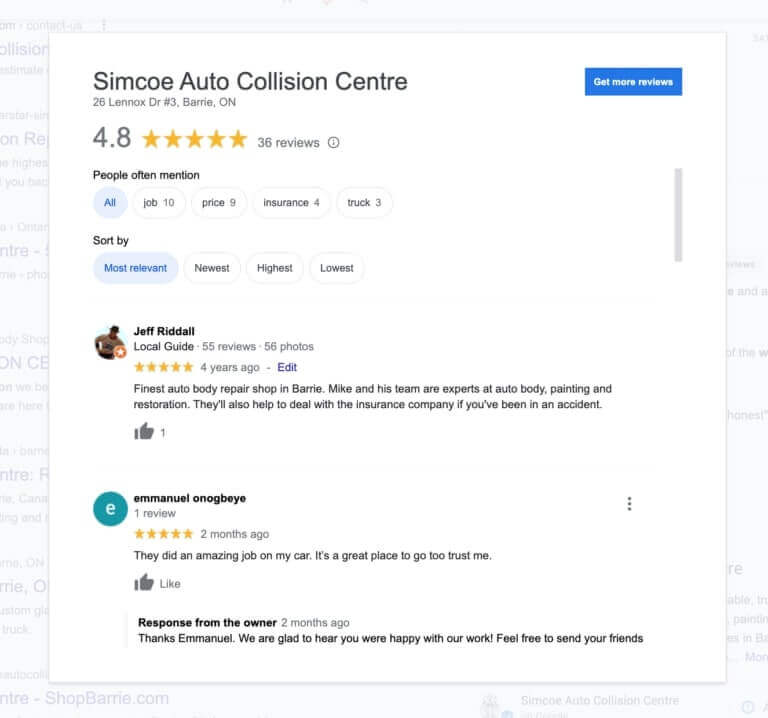
Приклад блоку відгуків у Google Business Profile.
Практика: зробіть короткий сценарій для команди — коли і як просити відгук. Наприклад: після завершення послуги + посилання на форму відгуку + коротка підказка «на що звернути увагу в тексті» (без нав’язування). Це дрібниця, але вона різко підвищує якість відгуків.
8. Вирівняйте NAP і цитування
NAP (Name, Address, Phone) має бути однаковим у профілі, на сайті та в зовнішніх згадках: каталоги, довідники, профільні майданчики. Для Google це спосіб «склеїти» інформацію про бізнес.
Почніть з простого: пошукайте назву компанії й телефон, складіть список джерел, де є ваша картка, і виправте розбіжності. Особливо часто «ламає картину» стара адреса після переїзду або різні формати телефону.
Додатково по темі: чи місцеві цитування (NAP) є фактором ранжирування Google .
9. Будуйте локальні посилання
Локальні зворотні посилання працюють як «підтвердження авторитету»: якщо про вас пишуть місцеві або профільні ресурси, це підсилює довіру.
Ідеї, які зазвичай виглядають природно:
- партнерські сторінки з суміжними бізнесами;
- профільні асоціації та каталоги (без «сміття»);
- локальні медіа/події, де вас згадують як учасника/партнера;
- якісні гостьові матеріали з практичною цінністю.
Якщо потрібна системна побудова посилань: послуги лінкбілдингу .
10. Працюйте з запитами
Контролюйте прогрес не «на око». Відстежуйте, за якими запитами ви з’являєтесь у Maps та в органічній видачі, і що саме приводить людей у профіль.
Що варто моніторити регулярно:
- переходи на сайт, дзвінки, запити маршруту;
- популярні запити («поруч зі мною», «кращий», «терміново», «недорого» — залежить від ніші);
- сторінки сайту, на які найчастіше переходять з профілю;
- динаміку відгуків та реакцій на них.
Для аналітики з нормальними відповідями, а не «відчуттями», зазвичай потрібні коректні налаштування: веб-аналітика .
Поставте бізнес на карту
Цей чек-лист працює найкраще, коли його робити не «разово», а як рутину: оновили дані, підтягнули сайт, відповіли на відгуки, додали нові фото, перевірили NAP, зібрали кілька локальних згадок — і так по колу.
Google зазвичай віддає перевагу компаніям, які виглядають живими, точними й корисними для людей: дають відповіді, чесно описують послуги, підтримують якість сервісу та не «граються» з накрутками.
Якщо це описує ваш бізнес — ви вже на правильному шляху.


