Технічне завдання (ТЗ) на розробку сайту – це робоча інструкція, за якою команда проєктує структуру, дизайн, функціонал, адмінпанель, інтеграції, SEO, аналітику і критерії приймання. Воно допомагає ще до старту зрозуміти, що саме потрібно створити, як сайт має працювати і за якими ознаками результат буде вважатися готовим.
Коли ТЗ для сайту написане поверхово, проблеми з’являються вже в процесі роботи: не врахували особистий кабінет, забули про імпорт товарів, не прописали оплату, не погодили структуру URL, не додали вимоги до SEO, аналітики або мобільної версії. У підсумку частина рішень приймається поспіхом, а бюджет змінюється після старту.
У SEO-Evolution ми зазвичай радимо починати не з дизайну, а з опису бізнес-логіки: що сайт має продавати або пояснювати, звідки мають приходити клієнти, які дії користувача є цільовими, хто обробляє заявки, які сторінки мають просуватися в Google і що буде вважатися готовим результатом.
Для простого корпоративного сайту технічне завдання може бути коротшим. Для інтернет-магазину воно має бути значно детальнішим: каталог, картка товару, кошик, оформлення замовлення, доставка, оплата, CRM, облік, знижки, ролі в адмінпанелі, аналітика, SEO і критерії приймання. Саме тому розробка інтернет-магазину без нормального ТЗ часто перетворюється на ланцюжок уточнень, переробок і непорозумінь.
Нижче – практична логіка, за якою можна підготувати технічне завдання на створення сайту, зрозуміти різницю між ТЗ для корпоративного проєкту й інтернет-магазину та використати зразок технічного завдання як основу для власного документа.
Що таке технічне завдання на розробку сайту
Технічне завдання на розробку сайту – це документ, який описує майбутній сайт з точки зору бізнесу, користувача, адміністратора, розробника, SEO-фахівця й аналітика. У ньому фіксують не тільки сторінки й дизайн, а й логіку роботи форм, каталогу, кошика, замовлень, інтеграцій, ролей, доступів, подій аналітики та умов приймання.
У хорошому ТЗ не пишуть просто зробити сучасний сайт або додати зручний каталог. Такі формулювання не допомагають розробнику зрозуміти задачу. Натомість потрібно описати, які саме розділи потрібні, як користувач рухається по сайту, що відбувається після заявки чи замовлення, хто обробляє дані, які системи мають бути підключені і за якими критеріями робота вважатиметься виконаною.
Технічне завдання на створення сайту не обов’язково має бути документом на 80 сторінок. Для невеликого сайту послуг достатньо структурованого опису на кілька розділів. Для інтернет-магазину, сервісного порталу або сайту з особистими кабінетами ТЗ має бути детальнішим, бо кожна непогоджена дрібниця може вплинути на вартість і строки.
Навіщо потрібне ТЗ перед розробкою
Перед стартом розробки сайту ТЗ прибирає невизначеність. Воно не гарантує, що в процесі не з’являться нові ідеї, але дає спільну точку відліку: що входить у проєкт, що не входить, які функції обов’язкові, а які можна винести в наступний етап.
Для замовника ТЗ на розробку сайту корисне з кількох причин:
-
стає зрозуміло, за що саме він платить;
-
легше порівнювати пропозиції різних підрядників;
-
менше ризику, що важливі функції згадають уже після погодження бюджету;
-
простіше контролювати роботу розробників;
-
з’являється основа для тестування і приймання готового сайту;
-
легше відокремити перший запуск від майбутніх доопрацювань.
Для підрядника ТЗ також важливе. Без нього оцінка проєкту майже завжди буде приблизною. Розробник може назвати стартову суму, але після уточнення функціоналу, інтеграцій, особистих кабінетів, SEO-вимог, сценаріїв оплати й доставки кошторис легко змінюється.
Хто має готувати ТЗ для сайту
Найкращий варіант – коли ТЗ готується спільно. Замовник добре розуміє бізнес, товари, клієнтів, внутрішні процеси, доставку, оплату й облік. Команда розробки розуміє технічні обмеження, логіку реалізації, ризики, інтеграції та залежності між функціями.
Якщо замовник самостійно пише ТЗ на розробку сайту, документ часто виходить або занадто загальним, або навпаки перевантаженим другорядними деталями. Якщо документ пише тільки підрядник без занурення в бізнес, у ньому можуть не з’явитися важливі процеси: обробка замовлень, різні умови доставки, групи клієнтів, повернення товарів, промокоди, залишки на складах.
У SEO-Evolution ми зазвичай працюємо так: бізнес описує цілі, товари, клієнтів і процеси, а спеціалісти переводять це в структуру сторінок, функціональні вимоги, технічні обмеження, SEO-блок, аналітику і критерії приймання. Так ТЗ для сайту стає не набором побажань, а зрозумілим планом робіт.
Що підготувати перед написанням ТЗ
Перед тим як скласти технічне завдання, корисно зібрати базову інформацію. Це економить час на обговореннях і допомагає швидше зрозуміти, який сайт потрібен насправді.
-
Опис бізнесу. Чим займається компанія, які товари або послуги продає, у яких регіонах працює, хто її клієнти.
-
Цілі сайту. Заявки, продажі, консультації, бронювання, реєстрації, повторні покупки, підписки або підтримка офлайн-продажів.
-
Приклади сайтів. Не для копіювання дизайну, а для розуміння логіки: що подобається, що незручно, які рішення варто врахувати.
-
Поточні матеріали. Логотип, брендбук, фото, тексти, каталог товарів, прайси, документи, старий сайт, доступи до аналітики.
-
Обмеження. Бюджет, бажані строки, потрібні інтеграції, обов’язкова CMS, особливості обліку, юридичні вимоги.
-
Поточні проблеми. Якщо сайт уже існує, потрібно зрозуміти, що саме не працює: структура, швидкість, заявки, дизайн, SEO, аналітика, адмінпанель.
Перед підготовкою ТЗ корисно подивитися не тільки конкурентів, а й реальні приклади готових робіт. Це допомагає швидше визначити, що ближче до задачі: корпоративний сайт, каталог, інтернет-магазин або сервісний проєкт. Для цього можна використати портфоліо SEO-Evolution як орієнтир по типах реалізації.

Як правильно описувати вимоги в ТЗ
Одна з головних помилок – писати вимоги надто загально. Розробник не може однаково зрозуміти фразу зробити зручну форму або додати нормальний каталог. У технічному завданні на розробку сайту кожна важлива функція має бути описана через поля, дії, стани, результат і винятки.
| Слабке формулювання | Як краще написати в ТЗ |
| Зробити форму заявки | Форма має містити поля: ім’я, телефон, email, коментар. Поля ім’я і телефон обов’язкові. Після відправки заявка надходить на email менеджера, створюється в CRM і показує користувачу повідомлення про успішну відправку. |
| Підключити оплату | Потрібна онлайн-оплата карткою через погоджену платіжну систему. Після успішної оплати статус замовлення змінюється на Оплачено. Якщо оплата не пройшла, покупець бачить повідомлення і може повторити оплату або вибрати інший спосіб. |
| Додати SEO | Для сторінок послуг, категорій, товарів і статей має бути можливість редагувати Title, Description, H1, canonical, SEO-текст, URL і статус індексації. Сайт має генерувати sitemap.xml і дозволяти налаштовувати robots.txt. |
| Зробити каталог | Каталог має містити категорії, підкатегорії, фільтри за ціною, брендом, характеристиками, кольором, розміром і наявністю. Для кожного товару потрібні фото, ціна, артикул, характеристики, опис, статус наявності та SEO-поля. |
| Підключити CRM | Після відправки заявки або оформлення замовлення в CRM має створюватися лід із даними клієнта, джерелом заявки, товарами, сумою замовлення і коментарем. Якщо CRM недоступна, заявка має зберегтися в адмінпанелі та надійти менеджеру на email. |
| Зробити мобільну версію | Сайт має коректно працювати на екранах смартфонів і планшетів. Меню, форми, кошик, фільтри, кнопки, таблиці й checkout мають бути зручними для використання без горизонтального скролу. |
Добре сформульована вимога відповідає на прості питання: хто виконує дію, де саме вона відбувається, які дані вводяться, що система робить після цього, що бачить користувач і що має статися у випадку помилки.
Структура ТЗ на розробку сайту
Структура ТЗ на розробку сайту залежить від типу проєкту, але базові розділи майже завжди повторюються. Нижче – логіка, яку можна використовувати для корпоративного сайту, сайту послуг, каталогу або інтернет-магазину.
1. Опис проєкту
У першому розділі потрібно коротко пояснити, який сайт створюється і яку задачу він має вирішувати. Від опису проєкту залежить структура, дизайн, функціонал, контент і майбутнє просування.
У цьому блоці варто вказати:
-
тип сайту: корпоративний сайт, каталог, інтернет-магазин, портал, сервіс, лендінг;
-
короткий опис бізнесу;
-
основні товари або послуги;
-
географію роботи;
-
мовні версії;
-
головну мету сайту: заявки, продажі, бронювання, консультації, реєстрації, підписки.
Приклад для сайту послуг: потрібно розробити корпоративний сайт для юридичної компанії з окремими сторінками послуг, блогом, формами заявок і можливістю редагувати контент через адмінпанель. Основна мета сайту – отримання заявок із Google, реклами та прямих переходів.
Приклад для інтернет-магазину: потрібно створити сайт для продажу меблів по Україні. У каталозі мають бути категорії, фільтри за розміром, матеріалом, кольором і ціною, картки товарів з фото, характеристиками, доставкою, оплатою та можливістю швидкого замовлення.
2. Цілі сайту
Цілі потрібні для прийняття рішень. Сайт, який має приводити заявки на послуги, і сайт, який має продавати тисячі товарів, потребують різної структури, різного дизайну і різної аналітики.
Приклади цілей:
-
отримувати заявки з органічного пошуку і реклами;
-
продавати товари онлайн з оплатою на сайті;
-
показати експертність компанії через кейси, блог і сторінки послуг;
-
зменшити навантаження на менеджерів завдяки автоматизації замовлень;
-
підготувати сайт до SEO-просування ще на етапі розробки.
Саме тут потрібно одразу прописати, які дії користувача вважатимуться цільовими: відправка форми, клік по номеру телефону, покупка, додавання товару в кошик, реєстрація, запит консультації, підписка на розсилку.
3. Цільова аудиторія
Опис аудиторії впливає на мову сайту, структуру меню, фільтри, дизайн, сценарії покупки і навіть на спосіб подачі інформації. Для B2B-сайту часто важливі документи, технічні характеристики, умови співпраці й довіра до компанії. Для B2C-магазину – швидкий вибір, зрозуміла ціна, доставка, відгуки, фото, оплата і просте оформлення замовлення.
У ТЗ для сайту достатньо описати 2–4 основні групи користувачів:
-
хто ці люди або компанії;
-
яку задачу вони хочуть вирішити;
-
що для них важливо під час вибору;
-
які заперечення можуть виникати перед заявкою або покупкою;
-
які пристрої вони частіше використовують.
Приклад: для інтернет-магазину меблів одна група аудиторії може шукати недорогі рішення з доставкою по Україні, друга – меблі під конкретні розміри, третя – товари для офісу з безготівковою оплатою. Для кожної групи можуть бути різні фільтри, аргументи, блоки довіри і сценарії покупки.
4. Структура сайту
Структура сайту – один з головних розділів ТЗ. Тут потрібно показати, які сторінки і розділи будуть на сайті, як вони пов’язані між собою і які з них мають бути посадковими для SEO або реклами.

Для сайту послуг структура може виглядати так:
-
головна сторінка;
-
сторінки основних послуг;
-
окремі посадкові сторінки під напрямки або міста;
-
про компанію;
-
кейси;
-
блог;
-
контакти;
-
службові сторінки: політика конфіденційності, умови використання, сторінка 404.
Для інтернет-магазину структура зазвичай ширша:
-
головна сторінка;
-
каталог товарів;
-
категорії та підкатегорії;
-
сторінки фільтрів, якщо вони потрібні для SEO;
-
картка товару;
-
кошик;
-
оформлення замовлення;
-
особистий кабінет покупця;
-
доставка і оплата;
-
обмін і повернення;
-
акції;
-
бренди;
-
блог або поради;
-
контакти.
Для структури бажано одразу додати приклади URL. Наприклад: /catalog/ , /catalog/mebli/ , /catalog/mebli/stoly/ , /product/nazva-tovaru/ , /delivery/ , /payment/ , /blog/ . Це допомагає розробнику, SEO-фахівцю і контент-менеджеру однаково розуміти майбутню архітектуру сайту.
Google окремо звертає увагу на те, що навігація і внутрішні посилання допомагають йому краще розуміти структуру eCommerce-сайту, а логічна URL-структура полегшує обхід сторінок. Тому структуру інтернет-магазину краще погоджувати до дизайну і програмування, а не після запуску. Документація Google щодо структури eCommerce-сайтів добре показує, чому це важливо ще на етапі проєктування.
5. Функціональні вимоги до сайту
Функціональні вимоги до сайту описують, що саме має вміти система. Це один із найважливіших розділів, бо саме він найбільше впливає на складність розробки.
Для звичайного сайту в цьому блоці можуть бути такі пункти:
-
форми заявок;
-
клік по номеру телефону з мобільного;
-
підписка на розсилку;
-
фільтрація послуг або кейсів;
-
пошук по сайту;
-
мультимовність;
-
керування сторінками через адмінпанель;
-
завантаження документів, фото або відео.
У кожному пункті бажано описувати не тільки назву функції, а й логіку її роботи. Наприклад, форма заявки: які поля має містити, які з них обов’язкові, куди надходить заявка, чи має приходити лист адміністратору, чи потрібне повідомлення користувачу після відправки.
Що додати в ТЗ для інтернет-магазину
ТЗ на інтернет-магазин має окрему специфіку. Тут недостатньо описати сторінки і дизайн. Потрібно зафіксувати, як працює каталог, як покупець додає товар у кошик, як проходить оформлення замовлення, як оновлюються ціни і залишки, як менеджер обробляє замовлення в адмінпанелі.

Каталог товарів
Каталог товарів інтернет-магазину потрібно описати через реальну структуру, а не загальною фразою - потрібен каталог. У ТЗ варто вказати:
-
категорії і підкатегорії;
-
основні характеристики товарів;
-
фільтри і сортування;
-
бренди або виробників;
-
наявність товарів;
-
варіації: розмір, колір, об’єм, комплектація;
-
умови показу товарів, яких немає в наявності;
-
правила формування URL для категорій, фільтрів і товарів.
Окремо треба вирішити, які сторінки фільтрів мають бути відкриті для індексації, а які не повинні потрапляти в пошук. Для великих магазинів це критично, бо фільтри можуть створити тисячі технічних URL без реальної користі для користувача.
Картка товару
Картка товару в інтернет-магазині має відповідати на основні питання покупця до того, як він натисне кнопку купити. У технічному завданні для інтернет-магазину потрібно описати, які дані виводяться на сторінці товару:
-
назва товару;
-
артикул або SKU;
-
бренд;
-
фото і відео;
-
ціна;
-
стара ціна, якщо є знижка;
-
наявність;
-
термін доставки;
-
короткий і повний опис;
-
характеристики;
-
варіації товару;
-
гарантія;
-
умови доставки й оплати;
-
відгуки;
-
схожі або супутні товари;
-
кнопки додавання в кошик і швидкої покупки.
Для SEO і товарної видачі також варто передбачити мікророзмітку Product. Google рекомендує використовувати структуровані дані, щоб краще розуміти інформацію про товар, ціну, наявність і відгуки. Детальні вимоги краще перевіряти в офіційній документації Google щодо Product structured data , бо підтримувані властивості й вимоги можуть змінюватися.
Кошик і оформлення замовлення
Кошик в інтернет-магазині здається простою функцією лише на перший погляд. У ТЗ потрібно описати, що саме може робити покупець:
-
додавати товар у кошик;
-
змінювати кількість;
-
видаляти позиції;
-
бачити суму замовлення;
-
бачити знижку або промокод;
-
бачити вартість доставки, якщо її можна розрахувати до оформлення;
-
повертатися до покупок без втрати товарів у кошику.
Оформлення замовлення в інтернет-магазині краще описувати окремим сценарієм: які поля заповнює покупець, чи може він купити без реєстрації, які способи доставки доступні, які способи оплати підключаються, що відбувається після підтвердження замовлення.
Оплата і доставка
Оплата в інтернет-магазині має бути описана не тільки як підключити платіжну систему. Потрібно вказати, які саме методи оплати потрібні: картка онлайн, післяплата, оплата на рахунок, Apple Pay, Google Pay, оплата частинами, оплата для юридичних осіб.
Для доставки варто прописати:
-
служби доставки;
-
розрахунок вартості;
-
вибір міста і відділення;
-
кур’єрську доставку;
-
самовивіз;
-
обмеження за вагою, регіоном або сумою замовлення;
-
передачу трек-номера покупцю.
Якщо планується інтеграція інтернет-магазину з доставкою або платіжною системою, у ТЗ потрібно зафіксувати конкретних провайдерів, доступність API, відповідального за ключі доступу і сценарії помилок: оплата не пройшла, доставка недоступна, відділення не знайдено, замовлення скасовано.
Особистий кабінет покупця
Особистий кабінет покупця не завжди потрібен на першому етапі. Якщо покупки разові, іноді достатньо оформлення без реєстрації. Якщо ж у магазині є повторні замовлення, бонуси, історія покупок, B2B-клієнти або персональні ціни, кабінет краще прописати в ТЗ одразу.
У кабінеті можуть бути:
-
особисті дані покупця;
-
історія замовлень;
-
статуси замовлень;
-
збережені адреси доставки;
-
список бажань;
-
бонусний баланс;
-
повторення попереднього замовлення.
Адмінпанель і ролі користувачів
Адмінпанель інтернет-магазину має бути зручною не для розробника, а для людей, які щодня працюватимуть із товарами, замовленнями, клієнтами і контентом. Права доступу краще прописати до розробки: хто редагує товари, хто бачить замовлення, хто змінює ціни, а хто має доступ лише до текстів і фото.
Типові ролі користувачів в адмінпанелі:
-
адміністратор;
-
контент-менеджер;
-
менеджер замовлень;
-
маркетолог;
-
SEO-фахівець;
-
бухгалтер або співробітник, який працює з оплатами.
Для кожної ролі варто визначити права доступу: хто може редагувати товари, хто бачить замовлення, хто змінює ціни, хто керує знижками, хто має доступ до налаштувань сайту.
Імпорт, експорт і синхронізація товарів
Для маленького магазину товари можна додавати вручну. Для великого каталогу це швидко стає проблемою. Якщо товарів багато, у ТЗ потрібно описати імпорт товарів в інтернет-магазин, експорт товарів, оновлення цін, залишків, характеристик і фото.
Окремо прописують:
-
формат файлів: CSV, XLSX, XML, YML або API;
-
частоту оновлення;
-
джерело даних;
-
що робити з товарами, яких немає у новому файлі;
-
як обробляти помилки імпорту;
-
чи потрібно вести журнал змін.
Якщо планується синхронізація цін і залишків з обліковою системою, це не можна залишати на потім. Інтеграція інтернет-магазину з CRM, 1С, ERP або складським обліком часто впливає на всю архітектуру проєкту.
Інтеграції в технічному завданні
Інтеграції – одна з найчастіших причин зміни бюджету після старту. На етапі обговорення вони можуть звучати просто: підключити CRM, оплату, доставку й аналітику. У розробці це перетворюється на конкретні API, ключі доступу, формати даних, обмеження, помилки і тестові середовища.
CRM краще не залишати одним рядком у стилі підключити CRM. Потрібно зафіксувати, які саме дані передаються, коли створюється лід, хто бачить заявку і що відбувається, якщо CRM тимчасово недоступна.
У ТЗ на розробку сайту або інтернет-магазину варто окремо описати:
-
CRM-систему;
-
облікову систему;
-
платіжну систему;
-
служби доставки;
-
email- і SMS-сервіси;
-
маркетплейси;
-
Google Merchant Center;
-
Google Analytics 4 і Google Tag Manager;
-
системи колтрекінгу або наскрізної аналітики.

Для кожної інтеграції потрібно вказати, які дані передаються, у якому напрямку, з якою частотою і що має відбуватися при помилці. Наприклад, якщо CRM недоступна, заявка не повинна зникнути. Вона має зберегтися на сайті або надійти менеджеру іншим каналом.
SEO в технічному завданні
SEO на етапі розробки сайту дешевше й простіше врахувати одразу, ніж переробляти структуру після запуску. Особливо це стосується інтернет-магазинів, де помилки з URL, фільтрами, дублікатами, canonical, пагінацією і sitemap можуть створити проблеми ще до початку просування.
У проєктах SEO-Evolution ми намагаємося погоджувати SEO-вимоги до старту розробки: структуру URL, мета-теги, індексацію фільтрів, sitemap, robots.txt, редиректи й аналітику. Це дешевше, ніж виправляти ті самі речі після запуску, коли сторінки вже потрапили в індекс.
У ТЗ варто додати окремий блок SEO-вимог:
-
логічна структура URL;
-
можливість редагувати Title, Description, H1;
-
людинозрозумілі URL;
-
canonical для сторінок, де це потрібно;
-
налаштування robots.txt;
-
sitemap.xml для основних типів сторінок;
-
окремі sitemap для товарів, категорій, статей або мовних версій, якщо сайт великий;
-
мікророзмітка для організації, хлібних крихт, статей, товарів;
-
коректні 404-сторінки;
-
301-редиректи при зміні старих URL;
-
можливість додавати SEO-тексти там, де вони справді потрібні;
-
швидкість завантаження і базові вимоги до Core Web Vitals.
Для інтернет-магазину SEO-вимоги мають бути ще точнішими: структура категорій, правила індексації фільтрів, мета-теги для інтернет-магазину, шаблони Title і Description для товарів, мікророзмітка Product, sitemap для товарів і категорій, логіка роботи сторінок брендів. Google окремо описує підхід до URL-структури eCommerce-сайтів, і ці рекомендації краще враховувати до запуску, а не після індексації помилкових сторінок. Рекомендації Google щодо URL для інтернет-магазинів варто використовувати як одну з опор при підготовці ТЗ.
Якщо сайт уже існує і планується редизайн або переїзд, перед розробкою варто провести технічний аудит сайту . Це допоможе не втратити важливі сторінки, трафік, редиректи, мета-дані й напрацьовану видимість у пошуку.
Якщо сайт уже існує
ТЗ на створення нового сайту і ТЗ на редизайн або перенесення старого сайту – це різні документи. Якщо сайт уже працює, не можна просто намалювати нову структуру і замінити стару. Потрібно зберегти те, що вже приносить трафік, заявки або продажі.
У такому ТЗ потрібно додати окремий блок міграції:
-
список важливих старих URL;
-
сторінки, які мають бути перенесені без зміни адрес;
-
карту 301-редиректів для сторінок, які змінять URL;
-
перенесення Title, Description, H1 і основного контенту;
-
перевірку старих сторінок з трафіком у Google Search Console;
-
перенесення кодів аналітики, рекламних тегів і подій;
-
перевірку robots.txt, sitemap.xml, canonical і статусів сторінок після запуску.
Цей блок особливо важливий, якщо сайт уже має органічний трафік. Невдалий редизайн може виглядати краще візуально, але втратити частину сторінок, позицій і заявок через помилки в структурі, редиректах або індексації.
Аналітика і події
Аналітику не варто відкладати до моменту, коли сайт уже запущений. Якщо цілі, події і передачу даних не прописати в ТЗ, після релізу часто виявляється, що покупки, заявки, кліки, додавання в кошик або етапи оформлення замовлення не відстежуються.
Для звичайного сайту потрібно визначити:
-
відправку форм;
-
кліки по телефону;
-
кліки по email;
-
кліки по месенджерах;
-
завантаження файлів;
-
перехід на сторінки подяки;
-
події для реклами.
Для інтернет-магазину потрібна аналітика електронної комерції: перегляд товару, додавання в кошик, початок оформлення замовлення, вибір доставки, оплата, покупка. Google описує рекомендовані eCommerce-події в GA4 у своїй документації, тому ці події краще передбачити до програмування кошика й checkout. Документація GA4 щодо eCommerce-подій допомагає зрозуміти, які саме дії потрібно передавати в аналітику.
У ТЗ варто прямо вказати, що аналітика має бути перевірена до запуску: події спрацьовують, дублювання немає, покупки передаються з коректною сумою, валютою, товарами і номером замовлення.
Дизайн, прототипи і мобільна версія
У розділі про дизайн не потрібно описувати лише кольори й шрифти. Важливіше зафіксувати, які сторінки потребують прототипів, які блоки мають бути на кожній сторінці і які сценарії користувача потрібно продумати.
Для сайту послуг зазвичай потрібні прототипи:
-
головної сторінки;
-
сторінки послуги;
-
сторінки кейсу;
-
статті блогу;
-
контактів.
Для інтернет-магазину додатково потрібні прототипи каталогу, категорії, картки товару, кошика, checkout, особистого кабінету, сторінки замовлення і сторінки результату оплати.
У сучасному ТЗ також варто прописати адаптивність. Google рекомендує responsive design як найпростіший для реалізації та підтримки підхід для мобільних сайтів. Для бізнесу це теж практично: один URL, одна сторінка, одна логіка контенту для різних пристроїв. Рекомендації Google щодо mobile-first indexing варто враховувати при погодженні дизайну і верстки.
Технічні вимоги до сайту
Технічні вимоги до сайту мають бути конкретними, але не завжди замовнику потрібно самостійно вибирати мову програмування, фреймворк або базу даних. Часто краще описати очікуваний результат, навантаження, інтеграції, вимоги до безпеки й підтримки, а технології погодити з командою розробки.
У цьому розділі можна прописати:
-
CMS або фреймворк, якщо є чітка вимога;
-
вимоги до хостингу або сервера;
-
підтримку актуальних версій браузерів;
-
адаптивність для мобільних пристроїв;
-
резервне копіювання;
-
логування помилок;
-
захист форм від спаму;
-
SSL-сертифікат;
-
контроль доступів до адмінпанелі;
-
обробку персональних даних;
-
можливість подальшого масштабування.
Для проєктів з авторизацією, оплатою, особистими кабінетами і персональними даними варто окремо прописати вимоги до безпеки. OWASP ASVS можна використовувати як орієнтир для перевірки безпеки вебзастосунків, особливо коли сайт працює з обліковими записами, ролями, сесіями й оплатами. OWASP Application Security Verification Standard дає структуровану основу для таких вимог.

Доступність і зручність
Доступність часто не потрапляє в ТЗ, хоча вона впливає і на користувачів, і на якість інтерфейсу. Йдеться не лише про людей з інвалідністю. Контрастний текст, зрозумілі кнопки, правильні підписи полів, помітні помилки у формах і керування з клавіатури роблять сайт зручнішим для всіх.
У ТЗ можна прописати базові вимоги:
-
достатній контраст тексту і фону;
-
зрозумілі назви кнопок;
-
підписи до полів форм;
-
повідомлення про помилки поруч із відповідними полями;
-
alt-тексти для змістовних зображень;
-
можливість користуватися основними елементами з клавіатури;
-
коректну ієрархію заголовків.
Для орієнтиру можна використовувати WCAG 2.2 – це міжнародні рекомендації W3C щодо доступності вебконтенту. Документ WCAG 2.2 не потрібно механічно переносити в ТЗ повністю, але основні принципи варто врахувати в дизайні, верстці і тестуванні.
Контент і управління сторінками
У технічному завданні на сайт потрібно описати, хто готує контент і як ним керуватимуть після запуску. Часто сайт уже готовий технічно, але запуск затримується через тексти, фото, характеристики товарів, юридичні сторінки або переклади.
У ТЗ варто зазначити:
-
хто пише тексти;
-
хто готує фото і відео;
-
які сторінки мають бути заповнені до запуску;
-
які блоки редагуються через адмінпанель;
-
чи потрібні шаблони для сторінок послуг, товарів, статей, категорій;
-
чи потрібна мультимовність;
-
хто відповідає за перенесення контенту зі старого сайту.
Для інтернет-магазину окремо описують контент товарів: назва, опис, характеристики, фото, інструкції, сертифікати, відео, атрибути для фільтрів, SEO-поля, дані для Merchant Center.
Хто за що відповідає
У ТЗ часто описують функції, але забувають про відповідальних. Через це запуск може затриматися не через розробку, а через відсутність текстів, фото, доступів, товарних даних або погоджень.
У технічному завданні на створення сайту варто зафіксувати:
-
хто надає логотип, брендбук, фото, відео і тексти;
-
хто готує товарний файл або дані для імпорту;
-
хто надає доступи до домену, хостингу, CRM, платіжної системи, служб доставки, Google Analytics, Google Tag Manager і Search Console;
-
хто погоджує структуру, прототипи, дизайн і функціонал;
-
хто тестує сайт з боку клієнта;
-
хто приймає фінальний результат;
-
у які строки надаються правки й погодження.
Цей розділ здається організаційним, але на практиці він часто рятує проєкт від затримок. Якщо не визначити відповідального за контент, сайт може бути технічно готовим, але не запущеним.
Критерії приймання сайту
Критерії приймання сайту потрібно прописати до початку робіт. Інакше наприкінці проєкту кожна сторона може по-різному розуміти, що означає сайт готовий.
У ТЗ варто зафіксувати, що перевіряється перед запуском:
-
усі погоджені сторінки створені;
-
форми працюють і заявки надходять у потрібні канали;
-
сайт коректно відкривається на мобільних пристроях;
-
немає критичних помилок у верстці;
-
адмінпанель дозволяє редагувати потрібні дані;
-
налаштовані мета-теги, sitemap, robots.txt;
-
підключена аналітика;
-
налаштовані редиректи зі старих URL, якщо був старий сайт;
-
проведене базове тестування швидкості, форм, інтеграцій і checkout.
Для інтернет-магазину тестування має включати повний шлях покупця: перегляд товару, фільтри, додавання в кошик, промокод, вибір доставки, оплату, створення замовлення, зміну статусу, листи покупцю і менеджеру, передачу даних у CRM або облік.
Що винести в перший запуск, а що залишити на другий етап
ТЗ на сайт не має перетворюватися на список усіх ідей, які колись можуть знадобитися. Якщо спробувати одразу запустити складний кабінет, бонусну систему, десятки інтеграцій, маркетплейси, розсилки й персональні ціни, проєкт може розтягнутися на місяці.
Для першого запуску інтернет-магазину зазвичай критичні:
-
зрозуміла структура каталогу;
-
категорії, картка товару, кошик і checkout;
-
базова оплата і доставка;
-
адмінпанель для товарів і замовлень;
-
SEO-база: URL, мета-теги, sitemap, robots.txt, canonical, мікророзмітка;
-
аналітика GA4 і ключові eCommerce-події;
-
перевірені форми, листи, статуси замовлень і передача заявок.
На другий етап можна винести бонусну систему, персональні ціни, складний B2B-кабінет, розширені інтеграції з маркетплейсами, автоматичні email-сценарії, програму лояльності, складні рекомендації товарів і додаткові рекламні механіки. Такий поділ допомагає швидше запустити сайт і не перевантажити перший реліз.
Чек-лист технічного завдання
Перед передачею ТЗ розробникам пройдіться по короткому чек-листу. Він допоможе швидко побачити, які блоки ще не описані.
| Розділ | Що має бути описано |
| Опис проєкту | Тип сайту, бізнес, мета, географія, мови, основні товари або послуги |
| Цілі | Заявки, продажі, реєстрації, покупки, дзвінки, підписки, інші цільові дії |
| Аудиторія | Основні групи користувачів, їхні задачі, заперечення, пристрої |
| Структура | Сторінки, розділи, категорії, службові сторінки, мовні версії, приклади URL |
| Функціонал | Форми, пошук, фільтри, кабінети, замовлення, ролі, сценарії користувачів |
| eCommerce | Каталог, картка товару, кошик, checkout, оплата, доставка, промокоди, залишки |
| Інтеграції | CRM, облік, платіжні системи, доставка, аналітика, маркетплейси, сценарії помилок |
| SEO | URL, мета-теги, canonical, robots.txt, sitemap, мікророзмітка, редиректи |
| Аналітика | GA4, GTM, події, цілі, eCommerce-події, рекламні конверсії |
| Відповідальні | Хто надає контент, доступи, товари, погодження, правки і фінальне приймання |
| Приймання | Критерії готовності, тестування, відповідальні, порядок виправлення помилок |
Приклад технічного завдання на розробку сайту
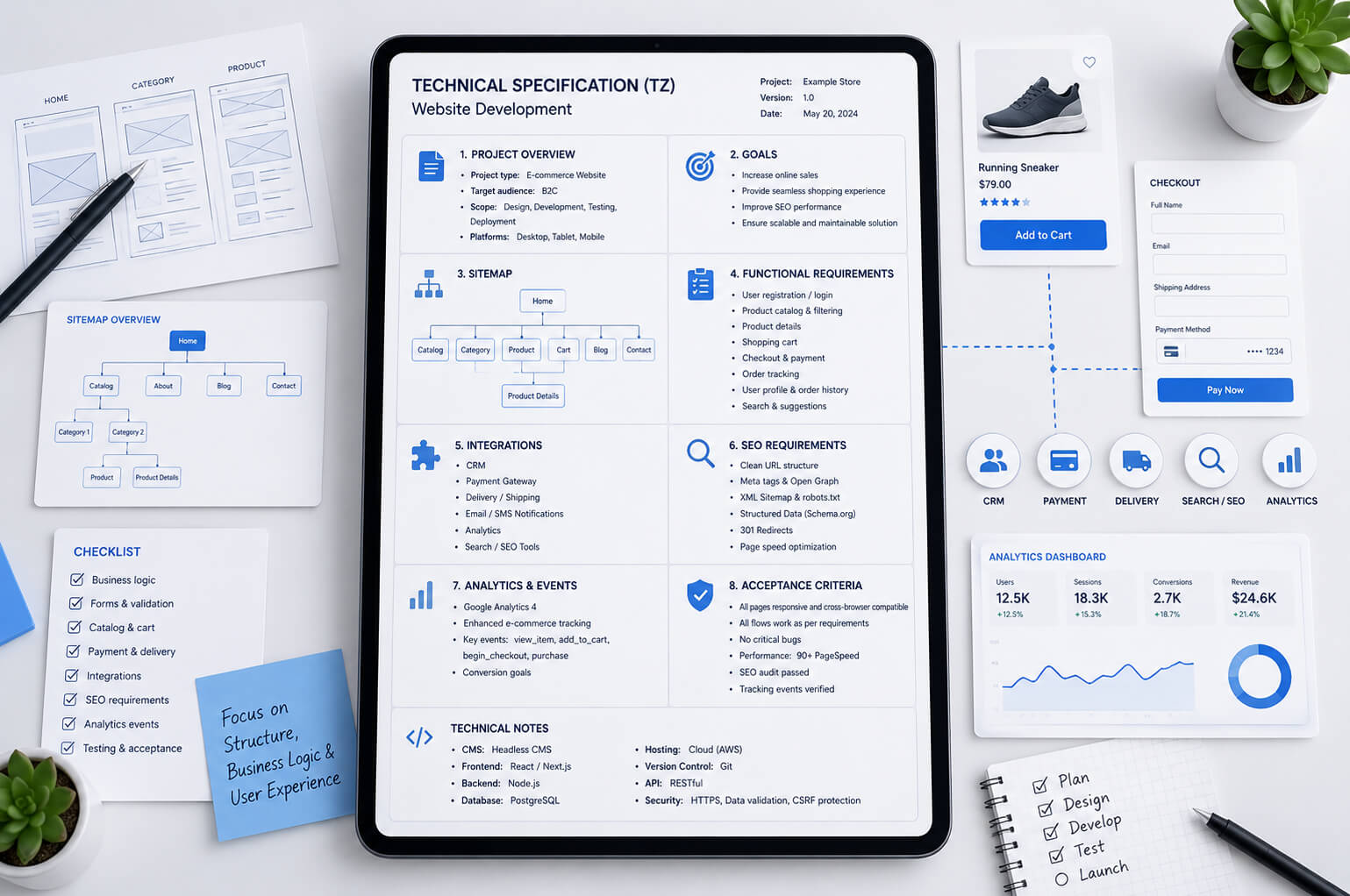
Нижче – зразок ТЗ на розробку сайту з блоком для інтернет-магазину. Його не потрібно копіювати без змін, але можна використати як основу і адаптувати під корпоративний сайт, каталог або eCommerce-проєкт.
1. Загальна інформація
Потрібно розробити інтернет-магазин товарів для дому з доставкою по Україні. Каталог на старті – приблизно 1500 товарів, у перспективі – до 10 000. Частина товарів має варіації за кольором, розміром і матеріалом. Дані про ціни та залишки оновлюються з облікової системи.
-
Тип проєкту: інтернет-магазин з блогом.
-
Мови: українська і російська на першому етапі, англійська – у другому релізі.
-
Географія продажів: Україна.
-
Основні цілі: онлайн-продажі, заявки, повторні покупки, SEO-трафік.
-
Ключові дії користувача: перегляд товару, додавання в кошик, оформлення замовлення, оплата, запит консультації.
2. Структура сайту
-
Головна сторінка –
/. -
Каталог товарів –
/catalog/. -
Категорії –
/catalog/mebli/. -
Підкатегорії –
/catalog/mebli/stoly/. -
Картка товару –
/product/nazva-tovaru/. -
Кошик –
/cart/. -
Оформлення замовлення –
/checkout/. -
Особистий кабінет покупця –
/account/. -
Доставка –
/delivery/. -
Оплата –
/payment/. -
Обмін і повернення –
/returns/. -
Акції –
/sale/. -
Блог –
/blog/. -
Контакти –
/contacts/.
3. Каталог і товари
Каталог має підтримувати категорії, підкатегорії, бренди, фільтри, сортування, пошук і сторінки товарів. Для кожного товару потрібно передбачити назву, артикул, бренд, фото, ціну, стару ціну, наявність, опис, характеристики, варіації, SEO-поля, схожі товари і статус активності.
Фільтри в каталозі: ціна, бренд, матеріал, колір, розмір, наявність, акція, рейтинг. Для кожного фільтра потрібно визначити, чи створює він індексовану сторінку, чи працює лише для користувача без відкриття для пошуку.
Якщо товару немає в наявності, кнопка покупки не показується або замінюється на повідомити про наявність. Неактивні товари не видаляються автоматично, щоб не створювати зайві 404-сторінки без рішення щодо SEO.
4. Картка товару
У картці товару мають бути:
-
назва товару;
-
артикул;
-
фотогалерея;
-
ціна і стара ціна;
-
статус наявності;
-
варіації товару;
-
характеристики;
-
опис;
-
умови доставки й оплати;
-
гарантія;
-
відгуки;
-
блок схожих товарів;
-
блок разом купують;
-
мікророзмітка Product;
-
SEO-поля: Title, Description, H1, canonical, URL.
5. Кошик і замовлення
Покупець має мати можливість додати товар у кошик, змінити кількість, видалити позицію, застосувати промокод, вибрати доставку і спосіб оплати. Після оформлення замовлення покупець бачить сторінку підтвердження, а менеджер отримує замовлення в адмінпанелі та CRM.
Для кожного замовлення потрібно зберігати номер, дату, товари, кількість, ціну, суму, дані покупця, спосіб доставки, спосіб оплати, статус і коментар.
Статуси замовлення:
-
Нове;
-
Підтверджене;
-
Очікує оплату;
-
Оплачено;
-
Передано в доставку;
-
Виконано;
-
Скасовано;
-
Повернення.
6. Оплата і доставка
Потрібно підключити онлайн-оплату через погоджену платіжну систему. У разі успішної оплати статус замовлення змінюється автоматично. У разі помилки покупець бачить зрозуміле повідомлення і може повторити оплату або вибрати інший спосіб.
Для доставки потрібно реалізувати вибір міста, відділення або адреси кур’єрської доставки. Дані доставки мають зберігатися в замовленні й передаватися менеджеру.
7. Адмінпанель
Адміністратор має керувати товарами, категоріями, замовленнями, клієнтами, промокодами, сторінками, блогом і SEO-полями. Для менеджерів потрібно створити окремі ролі з обмеженим доступом.
Контент-менеджер може редагувати товари, фото, характеристики і тексти, але не має доступу до технічних налаштувань сайту. Менеджер замовлень бачить замовлення і змінює їхні статуси, але не редагує структуру сайту.
8. SEO-вимоги
-
Для всіх основних сторінок має бути можливість редагувати Title, Description і H1.
-
URL мають бути зрозумілими і логічними.
-
Потрібно реалізувати canonical для сторінок, де можливі дублікати.
-
Потрібно створити sitemap.xml для категорій, товарів, статей і статичних сторінок.
-
Потрібно налаштувати robots.txt.
-
Потрібно додати мікророзмітку BreadcrumbList і Product.
-
Сторінка 404 має бути оформлена і повертати коректний код відповіді.
-
При перенесенні зі старого сайту потрібно підготувати карту 301-редиректів.
Для проєктів, які планують просування після запуску, SEO-вимоги краще погоджувати до програмування. Інакше частину робіт доведеться переробляти вже в межах SEO-просування сайту , коли помилки вже потрапили в індекс або почали впливати на видимість.
9. Аналітика
На сайті потрібно встановити Google Tag Manager і Google Analytics 4. Для інтернет-магазину потрібно налаштувати eCommerce-події: перегляд товару, додавання в кошик, початок оформлення замовлення, вибір доставки, покупка. Також потрібно передавати суму замовлення, валюту, товари і номер транзакції.
10. Тестування і приймання
Перед запуском потрібно перевірити роботу сайту на актуальних версіях Chrome, Safari, Firefox і мобільних браузерах. Окремо тестуються форми, кошик, оплата, доставка, особистий кабінет, адмінпанель, інтеграції, SEO-поля, sitemap, robots.txt, аналітика і швидкість завантаження.
Обов’язкові сценарії тестування:
-
покупка з оплатою онлайн;
-
покупка з післяплатою;
-
замовлення товару, якого немає в наявності;
-
застосування промокоду;
-
помилка оплати;
-
повторна оплата;
-
зміна статусу замовлення;
-
передача замовлення в CRM;
-
передача покупки в GA4.
Сайт вважається готовим до запуску, якщо всі погоджені сторінки створені, основні сценарії працюють, критичних помилок немає, заявки і замовлення надходять у потрібні канали, а аналітика фіксує ключові події.
Що не варто включати в ТЗ
Технічне завдання на розробку сайту не має перетворюватися на хаотичний список усіх ідей. Якщо частина функцій не потрібна на першому етапі, краще винести їх у другий реліз. Так простіше контролювати бюджет і швидше запустити сайт.
Не варто включати в основне ТЗ:
-
функції, які поки не мають бізнес-логіки;
-
інтеграції без доступів і підтвердженої можливості підключення;
-
побажання без конкретного сценарію використання;
-
технології, які обрані випадково, а не через задачу проєкту;
-
надмірну деталізацію дизайну там, де спочатку потрібен прототип.
Хороше ТЗ не повинно описувати кожен піксель. Його задача – прибрати невизначеність у функціоналі, структурі, даних, інтеграціях, SEO, аналітиці і прийманні робіт.
Висновок
Технічне завдання на розробку сайту потрібне як розробнику так і замовнику. Воно допомагає перетворити ідею в зрозумілий план робіт: які сторінки створюються, які функції потрібні, як працює адмінпанель, які інтеграції підключаються, що має бути з SEO, аналітикою, безпекою і прийманням.
Для інтернет-магазину ТЗ особливо важливе, бо eCommerce-проєкт складається не тільки з дизайну і каталогу. Там є товари, залишки, ціни, кошик, checkout, доставка, оплата, CRM, облік, аналітика, мікророзмітка і сценарії роботи менеджерів. Якщо ці речі не описати до старту, вони майже неминуче з’являться як додаткові роботи.
Найкращий підхід – починати не з вибору дизайну, а з нормального опису задачі, структури, функцій і критеріїв готовності. Тоді сайт простіше оцінити, розробити, протестувати, запустити і далі розвивати без постійних переробок.