The meta robots tag is used to give search engine crawlers instructions for a specific page: whether to show it in search results, whether to process the links on it, whether to generate a snippet, show image previews, or remove the page from search after a certain date.
It is not a replacement for robots.txt. The robots.txt file controls URL crawling, while meta robots works at the level of a specific HTML page after a crawler has been able to open it. If a page needs to be removed from Google’s index, use noindex and do not block that page in robots.txt; otherwise, Googlebot may not see the indexing restriction.
At SEO-Evolution, we check meta robots during a technical audit together with robots.txt, canonical, sitemap.xml, filter pages, pagination, language versions, and statuses in Google Search Console. If a site has an accidental noindex, important sections blocked from crawling, or conflicting rules, traffic may drop even when the content and links look fine.
Below is the current logic of how meta robots, noindex, nofollow, X-Robots-Tag, and typical mistakes work, including issues that prevent pages from being indexed or keep them in Google longer than expected.
What is meta robots
Meta robots, or the robots meta tag, is an HTML tag placed in the page code that sends search engines rules for processing that page. Most often, it is placed in the <head> section.
<meta name="robots" content="noindex">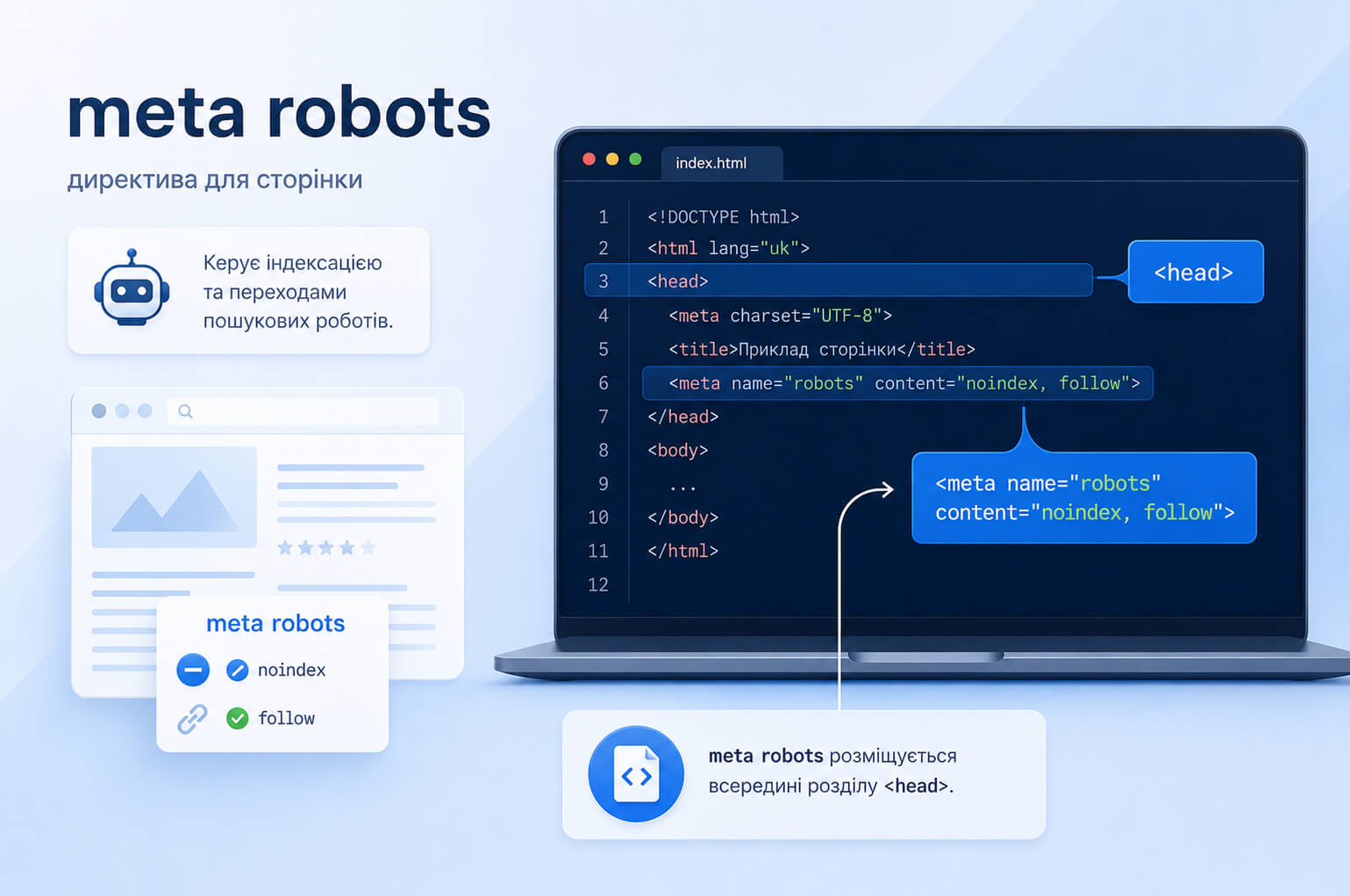
In the line meta name="robots" content="noindex" , the name attribute shows which crawlers the rule applies to, while content contains the directive itself. If robots is specified, the rule is addressed to all search engine crawlers that support the directive.
For Google, you can set a separate rule using googlebot :
<meta name="googlebot" content="noindex">In most cases, the general name="robots" option is enough. Use separate rules for Googlebot only when there is a specific technical reason.
Google documentation describes the robots meta tag as a page-level way to control indexing and the display of content in search results. You can check the current directives in the official Google documentation on the robots meta tag and X-Robots-Tag .
Meta robots and robots.txt: what is the difference
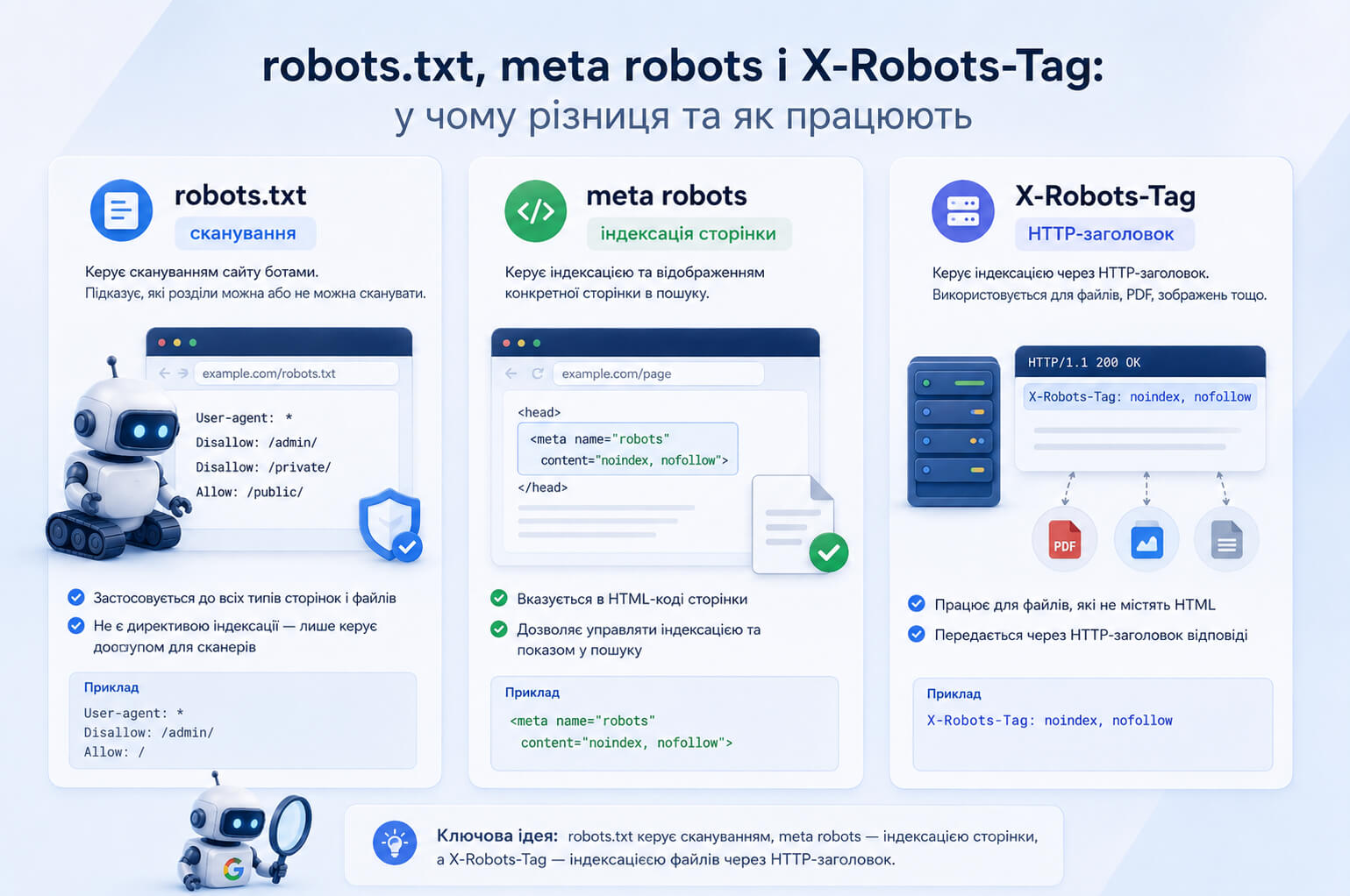
Meta robots and robots.txt are often used side by side, but they control different things. Robots.txt is used to manage crawling, while meta robots controls indexing and the appearance of a specific page in search results.
| Tool | What it controls | When to use it |
| robots.txt | Crawling of URLs by search engine robots | When you need to limit crawling of technical sections or areas that are not important for crawling |
| meta robots | Indexing and display of an HTML page in search | When a page should remain available to users but should not appear in Google |
| X-Robots-Tag | Indexing through an HTTP header | When you need to control indexing of PDFs, images, videos, or groups of URLs at the server level |
Example of robots.txt:
User-agent: *
Disallow: /private/
This rule prevents crawlers from scanning the /private/ section. But it does not guarantee that the URL will not appear in search if Google finds it through internal or external links.
If you need to remove an HTML page from Google, add noindex and keep the page available for crawling:
<meta name="robots" content="noindex">Do not use Noindex in robots.txt. Google does not support this method of blocking indexing:
User-agent: *
Noindex: /example-page/
You can read more about the file itself in the article what robots.txt is and why it is needed . This article focuses specifically on meta robots, noindex, nofollow, and X-Robots-Tag.
Where meta robots is placed in HTML
Meta robots is added to the <head> section of the page:
<!DOCTYPE html>
<html lang="en">
<head>
  <meta charset="UTF-8">
  <title>Page title</title>
  <meta name="robots" content="noindex, follow">
</head>
<body>
  ...
</body>
</html>
On CMS-based websites, this rule is often added through an SEO module, page template, content type settings, or global theme settings. After a redesign, migration, or launch of a new template, check different URL types: the home page, service pages, categories, products, blog articles, filters, pagination, language versions, and service pages.
As part of a technical website audit , these checks help find accidental noindex rules, pages blocked in robots.txt, incorrect canonicals, and conflicts between CMS templates and server headers.
Noindex, nofollow, index, and follow: how to use them
Meta robots has two basic groups of rules. The first controls indexing of the page itself. The second controls how links on that page are processed.
| Directive | What it controls | Simple explanation |
| index | Page indexing | The page can be added to the index and shown in search. This is the default behavior. |
| noindex | Page indexing | The page should not be shown in search results. |
| follow | Links on the page | The crawler can use links on the page to discover related URLs. This is also the default behavior. |
| nofollow | Links on the page | The crawler should not follow links placed on this page. |
| none | The page and links | A shortcut for noindex, nofollow . |
| all | The page and links | Default behavior without restrictions. For Google, explicitly adding this directive has no additional effect. |
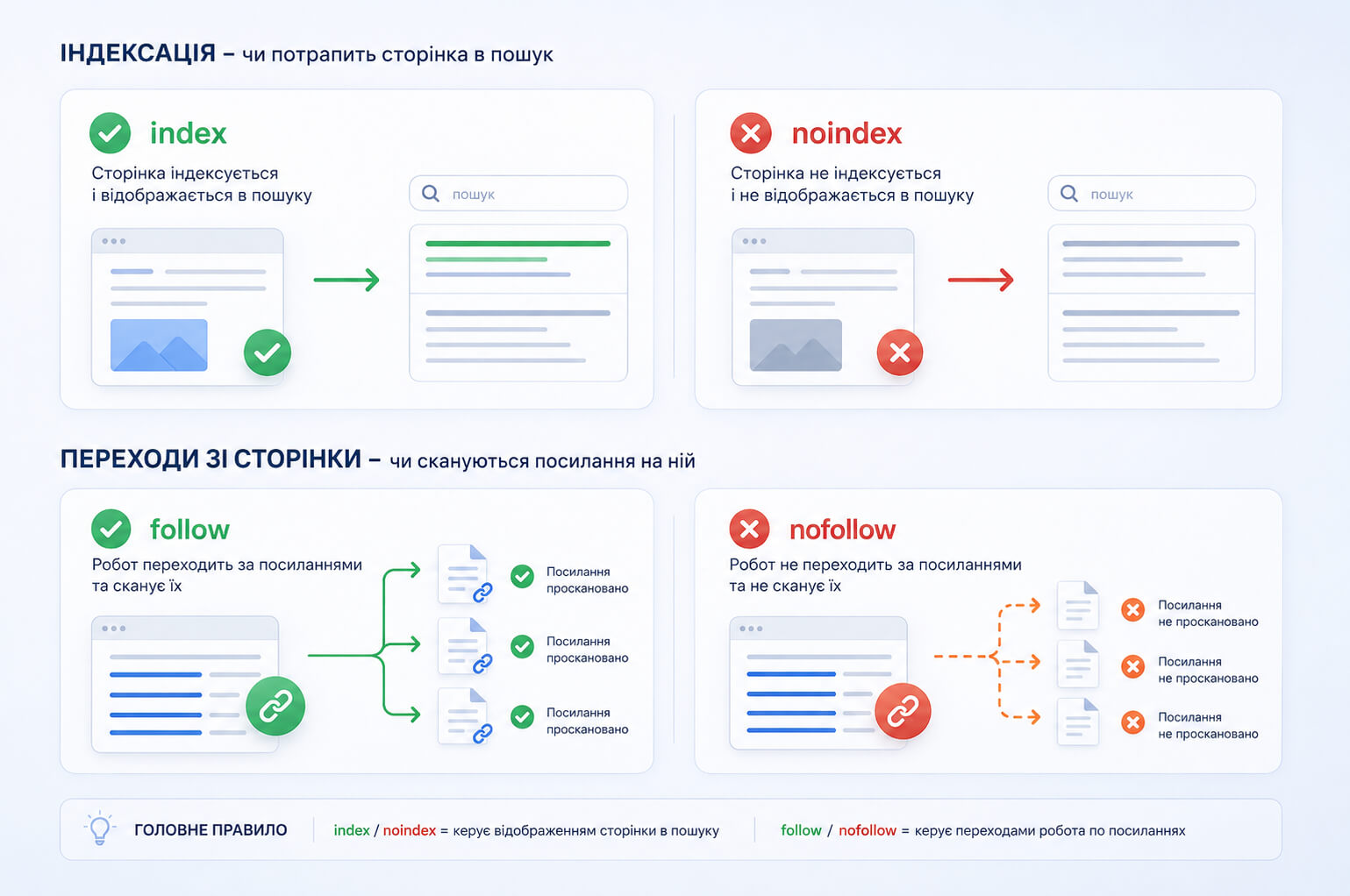
The key distinction is this: noindex relates to page indexing, while nofollow relates to links on the page. If only nofollow is specified in meta robots, it does not mean that the page is blocked from indexing.
Main meta robots combinations
Several rules can be combined in content using a comma. Below are the combinations most often seen in SEO.
| Entry | What it means | Comment |
<meta name="robots" content="index, follow"> |
Index the page and follow links | Usually there is no need to specify this because it is the standard behavior. |
<meta name="robots" content="noindex, follow"> |
Do not show the page in search, but allow link processing | Useful for some service or duplicate pages if the links on them help the crawler move further through the site. |
<meta name="robots" content="noindex, nofollow"> |
Do not index the page and do not follow links | A strict rule. Before using it, check whether it breaks important internal navigation. |
<meta name="robots" content="none"> |
The same as noindex, nofollow |
A short form. For transparency in larger teams, it is often clearer to write the full combination. |
<meta name="robots" content="all"> |
No restrictions | For Google, this is the default rule, so it rarely needs to be added explicitly. |
If conflicting rules appear on the same page, Google follows the more restrictive one. That is why, during a check, you should look not only at the HTML code but also at HTTP headers, CMS templates, SEO plugins, and server rules.
When to use noindex
Noindex is needed when a page should remain available to users but should not appear in search results. This may include a thank-you page after form submission, internal site search results, some technical filters, a temporary page on a production domain, or a duplicate page with no independent search value.
<meta name="robots" content="noindex">Before closing a page from indexing, check the data in Google Search Console: impressions, clicks, queries, internal links, and the canonical version. A page may look weak but still have a useful long tail of queries or help the user move toward conversion.
Do not use noindex as a universal way to remove all weak pages. First identify the cause: lack of demand, duplication, thin content, incorrect canonical, unnecessary filters, poor structure, or mismatch with user intent.
Nofollow in meta robots and rel="nofollow" are different things
Meta robots nofollow works at the level of the entire page:
<meta name="robots" content="nofollow">This rule applies to all links placed on the page. It does not block indexing of the page itself. If a page has only nofollow, Google may still index the page, but it should not follow links from it.
| Option | How it works |
<meta name="robots" content="nofollow"> |
Applies to all links on the page. |
<a href="..." rel="nofollow"> |
Applies to one specific link. |
If you need to mark an advertising, partner, or user-generated link, work with attributes of the specific link: rel="nofollow" , rel="sponsored" or rel="ugc" . Meta robots nofollow is not suitable for managing one individual link selectively.
Canonical, 404, 410, and noindex: what to choose
Noindex does not replace canonical, 404, 410, or a 301 redirect. These are different tools for different situations.
| Situation | What to use | Explanation |
| There are several similar URLs, but one main version | Canonical | Shows the preferred canonical page, but does not guarantee that the duplicate will be removed from the index. |
| The page is available to users but not needed in search | Noindex | The page can open, but it should not be shown in Google. |
| The content has been removed and there is no replacement | 404 or 410 | The search engine receives a signal that the page no longer exists. |
| There is a new relevant page instead of the old one | 301 redirect | The user and the crawler are sent to the current URL. |
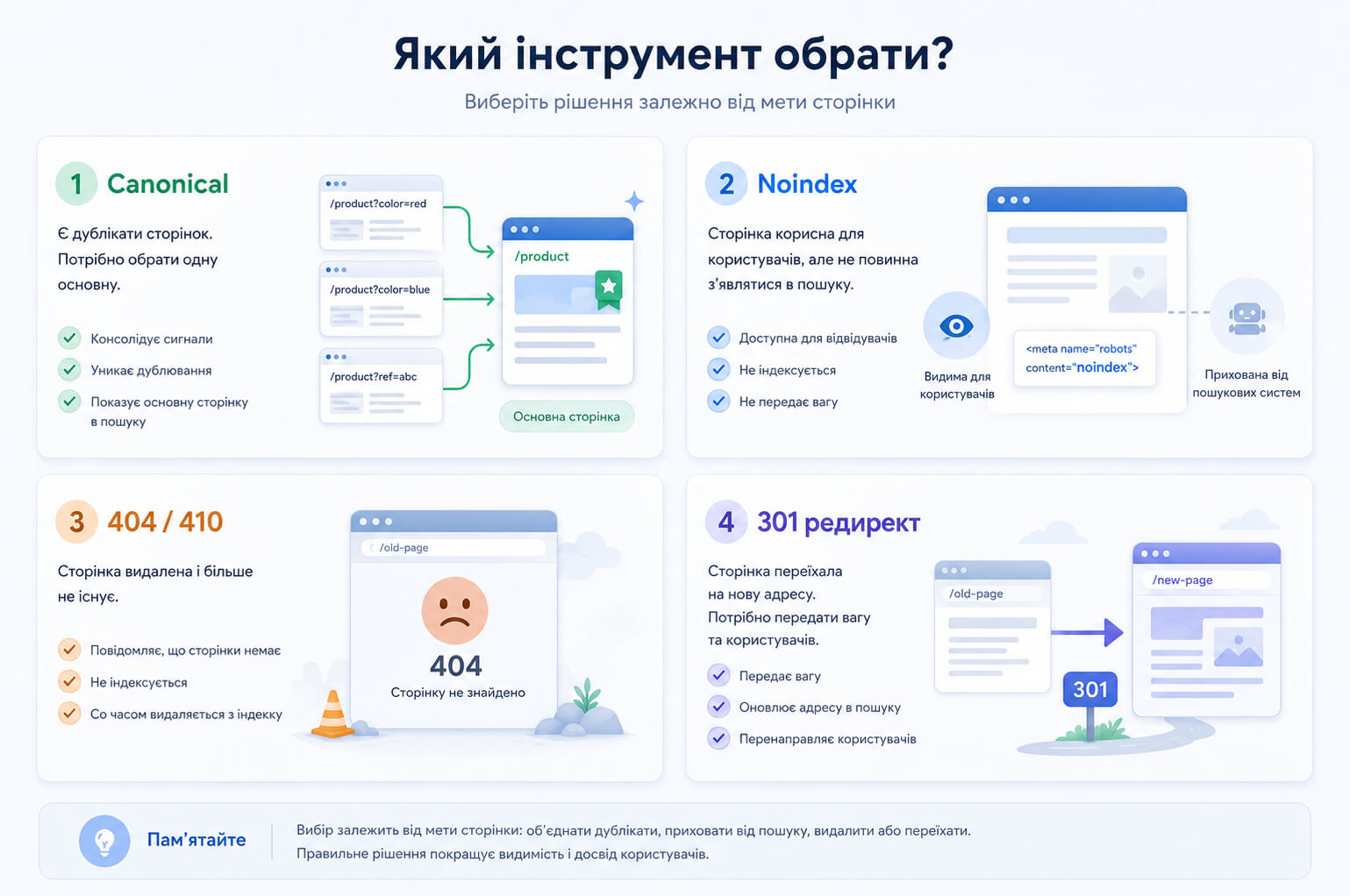
For example, if a product has been fully discontinued and has no alternative, a 404 or 410 is often more logical. If the product has been replaced by a new model, a 301 redirect is appropriate. If the page is needed by users but should not appear in Google, use noindex.
When X-Robots-Tag is needed
X-Robots-Tag is an HTTP header set in the server response. It performs a similar task to meta robots, but works not in the HTML code, but at the HTTP response level.
HTTP/1.1 200 OK
X-Robots-Tag: noindex
X-Robots-Tag is needed when you cannot add meta robots to HTML or when you work with non-HTML files: PDFs, images, videos, downloadable documents.
For PDF files, the rule may look like this:
X-Robots-Tag: noindexExample for Apache:
<Files ~ "\.pdf$">
  Header set X-Robots-Tag "noindex, nofollow"
</Files>
Example for NGINX:
location ~* \.pdf$ {
  add_header X-Robots-Tag "noindex, nofollow";
}
Before applying noindex to files in bulk, check whether they bring search traffic. Instructions, public catalogs, technical documents, presentations, or price lists sometimes have their own search value.
Google directives for snippets, images, and temporary pages
In addition to noindex and nofollow, Google supports extra rules for managing how a page appears in search results.
| Directive | What it does |
| nosnippet | Prevents a text snippet and video preview from being shown for the page. |
| max-snippet | Limits the maximum number of characters in the text snippet. |
| max-image-preview | Controls the size of the image preview in search. |
| max-video-preview | Limits the length of the video preview. |
| notranslate | Prevents Google from offering a translation of the page in search results. |
| noimageindex | Prevents images on the page from being indexed. |
| unavailable_after | Specifies the date after which the page should no longer be shown in search. |
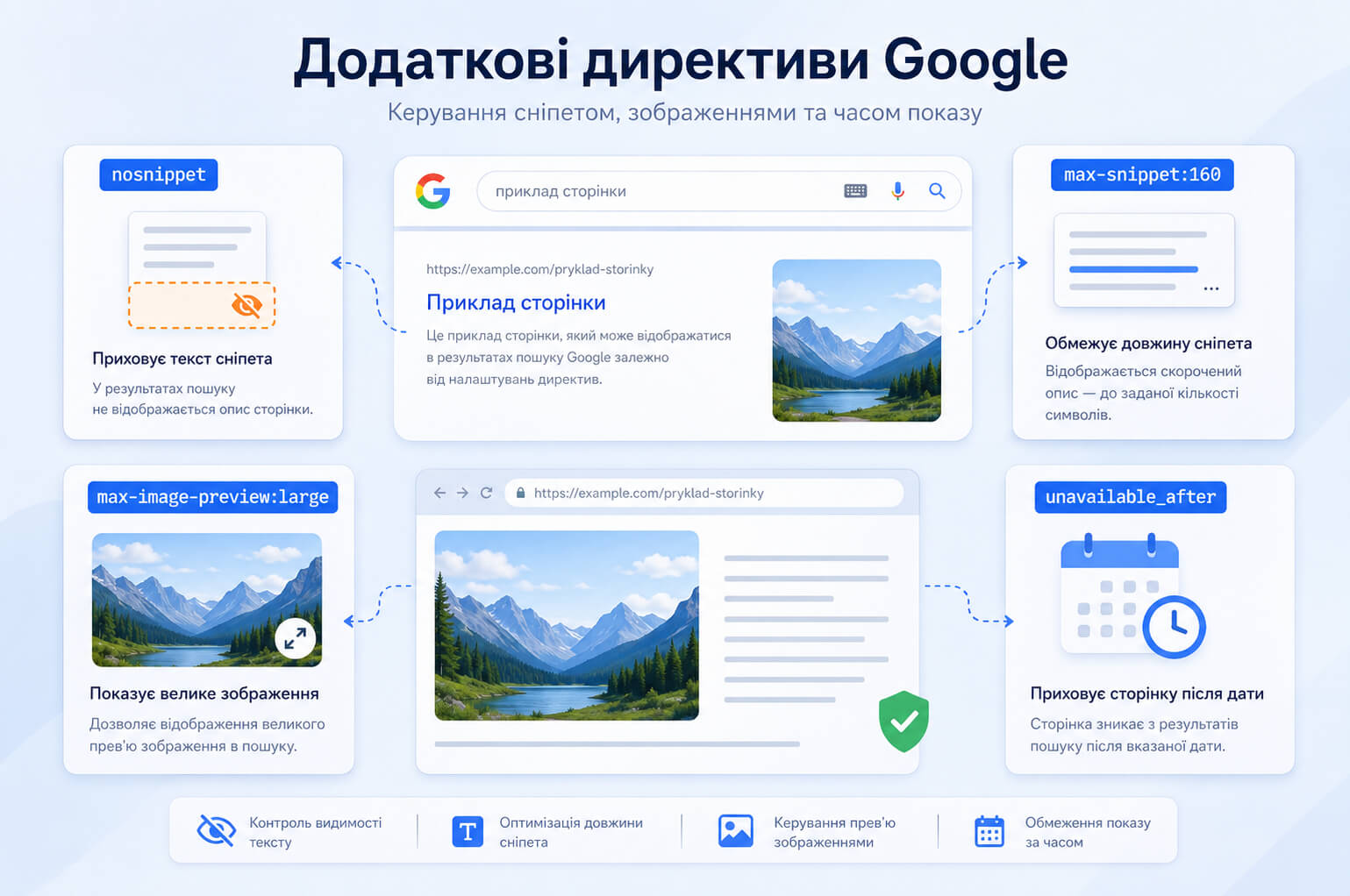
Example for a snippet and image preview:
<meta name="robots" content="max-snippet:160, max-image-preview:large">Example for a page that should be removed from search after a certain date:
<meta name="robots" content="unavailable_after: Wed, 31 Dec 2026 23:59:59 GMT">For unavailable_after , use a date format that Google can recognize. If the format is invalid, the directive may be ignored.
Do not limit snippets or images without a reason. For pages that already perform well in search, these directives can make the result less attractive and reduce click-through rate.
Outdated directives in old templates
Old SEO instructions and templates still sometimes contain directives that no longer have practical value for Google or are tied to long-outdated search mechanisms.
| Directive | Current status |
| noarchive | Google no longer uses the cached link in the form for which this directive was needed. |
| nocache | Not used by Google Search. |
| nositelinkssearchbox | Not used by Google Search to control the sitelinks search box. |
| noodp | An outdated directive from the time of directories that no longer influence snippet generation in Google. |
| noydir | An outdated directive connected with old search engine mechanisms. |
If a site template still contains noodp , noydir or other historical rules, it is not always a critical error. But it is a good reason to review the technical indexing settings fully.
Common mistakes with meta robots
Problems with meta robots usually appear not because of the tag itself, but because of incorrect implementation logic. Below are the mistakes that most often affect indexing.
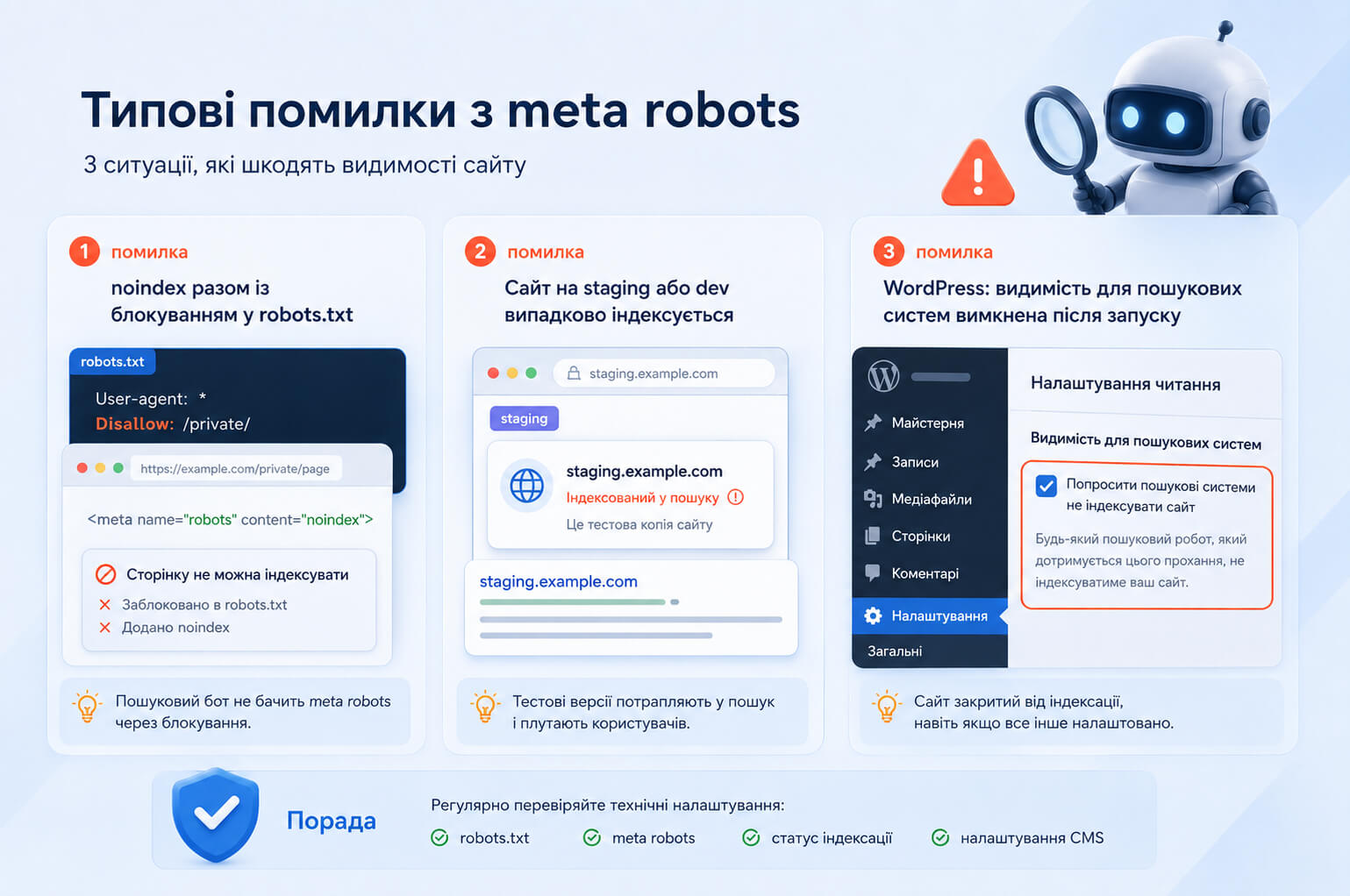
Noindex and robots.txt blocking at the same time
If a page is blocked in robots.txt, Googlebot may not open it and may not see noindex. To remove a page from search, allow crawling and add noindex.
Accidental noindex in a template
After development or redesign, noindex sometimes remains on all pages, on a specific page type, or on a language version. Check typical URLs: services, categories, products, articles, pagination, filters, and city pages.
Unnecessary index, follow
The index, follow entry usually does not harm anything, but it also does not solve a task. If a page should be indexed, it is enough not to set restrictive directives.
Meta robots nofollow instead of rel="nofollow"
If you need to mark one advertising or partner link, do not close all links on the page through meta robots nofollow. Use an attribute for the specific link.
Noindex on pages with traffic
Before closing a page, check whether it brings impressions, clicks, or conversions. For pages with potential, it is sometimes better to update the content, change the structure, improve internal linking, or consolidate duplicates through canonical.
Noindex is missing on a test copy of the site
A test copy of a website should not get into the index. We often see this mistake when analyzing websites that come to SEO-Evolution after a traffic drop: a dev domain, subdomain, or technical copy is open for crawling, the pages use the standard index, follow behavior and gradually appear in Google.
This creates duplicates of the live website, confuses search engines, and can affect the indexing of the main pages. It is better to protect the test version not only with noindex, but also with password access or IP restrictions. Noindex works as an additional layer, but not as the only way to protect a technical copy.
Noindex for the entire WordPress site after launch
The opposite situation is also common: the site has already been moved to the live domain, but indexing is still disabled in WordPress. In this case, pages may have meta robots noindex, nofollow even though the site should already be indexed and receive organic traffic.
Check this in the WordPress admin panel: Settings → Reading → Search Engine Visibility . If the checkbox next to Discourage search engines from indexing this site is enabled, uncheck it and click Save Changes . In a Ukrainian admin panel, the path may look like this: Налаштування → Читання → Видимість для пошукових систем → Попросити пошукові системи не індексувати цей сайт.
After that, check several important pages in Google Search Console using the URL Inspection Tool. If Google has already seen noindex, it needs time to crawl the pages again and update their status.
How to check noindex and meta robots in Google Search Console
The check should be done on several levels. Looking at the HTML code alone does not always show the full picture, because the rule may come through an HTTP header or change after rendering.
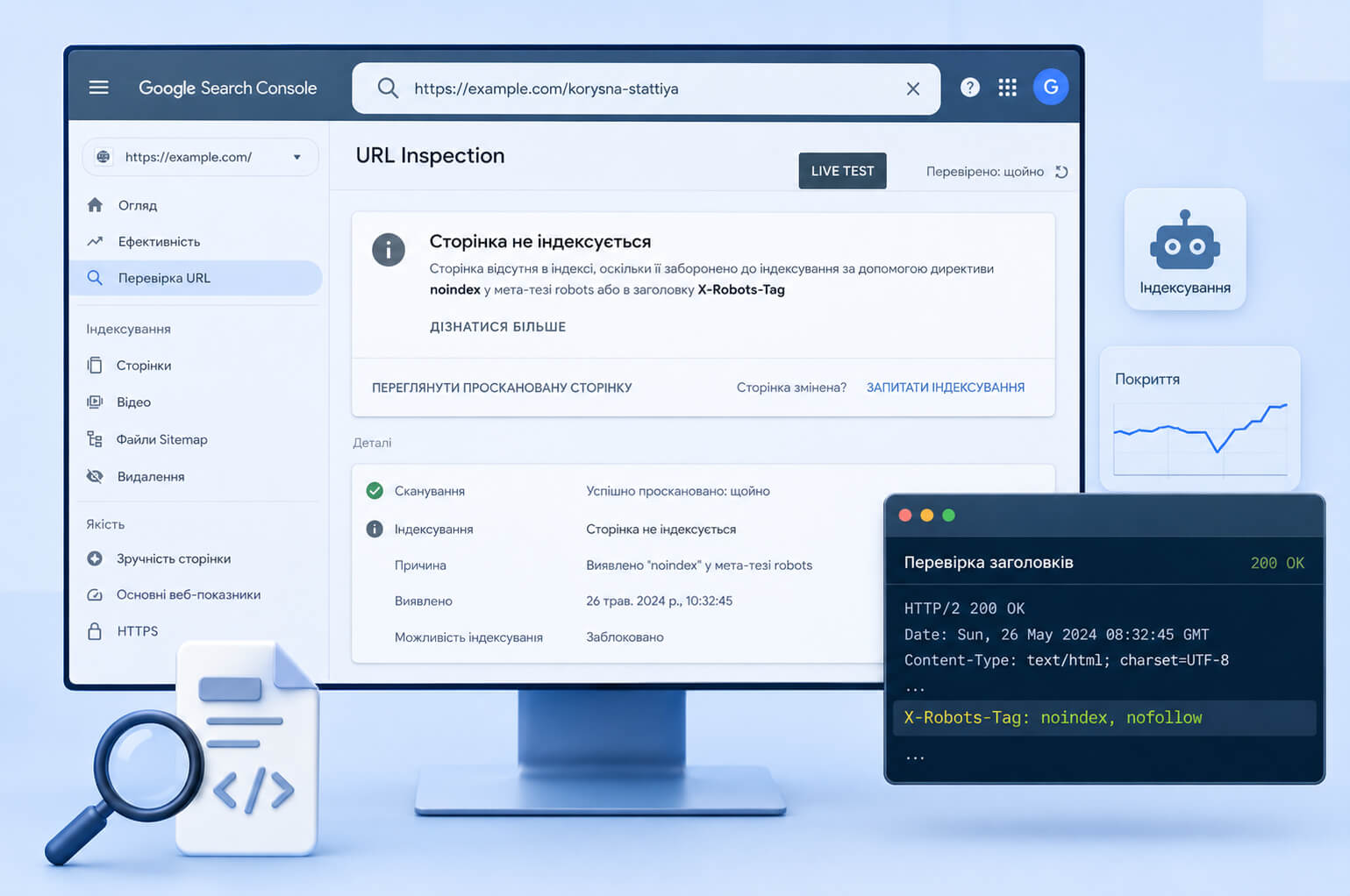
- Open the page in a browser, view the source code, and find
meta name="robots". - Check the URL in Google Search Console using the URL Inspection Tool.
- Run a live test to see the current version of the page for Googlebot.
- Open the Page Indexing report and find pages with statuses related to noindex.
- Check HTTP headers if you suspect X-Robots-Tag.
- Compare meta robots, robots.txt, canonical, and sitemap.
For a quick HTTP header check, use the command:
curl -I https://example.com/file.pdfIf the response contains X-Robots-Tag: noindex , indexing is controlled by the server header, not by the HTML code of the page.
In Google Search Console, the problem may appear as a page where indexing is blocked by the noindex tag. If noindex has already been removed, request recrawling through the URL Inspection Tool and wait for the status to update. For a large number of URLs, update the sitemap and check whether robots.txt is blocking the pages.
Conclusion
The meta robots tag is used to control how search engines process a specific HTML page. Noindex is responsible for page indexing, while nofollow is responsible for links on the page. These are different actions, so they should be configured separately and not mixed with attributes of individual links.
Robots.txt does not replace meta robots. It limits crawling, but it is not a reliable way to remove an HTML page from Google. To prevent a page from being shown in search, use noindex; for PDFs and other non-HTML files, use X-Robots-Tag; for removed pages, use 404, 410, or a 301 redirect depending on the situation.
Before making changes, check which pages already bring traffic, where duplicates exist, which URLs are useful for users, and which ones create technical noise. If noindex, canonical, robots.txt, and sitemap are configured chaotically, website SEO promotion should start with cleaning up technical indexing issues. Examples of complex website work can be found in the SEO-Evolution portfolio .